NotepadMac icon
NotepadMac icon

NotepadMac

NotepadMac is a native Cocoa port of Notepad++ for the Mac. It is built on the same Scintilla editing engine and Lexilla syntax highlighting as the Windows original, and reads Notepad++'s own language, style, theme, function-list, shortcut and translation files.
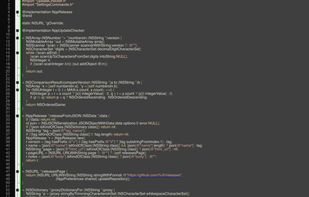
NotepadMac screenshot 1

Cost / License

Platforms

  • Mac
0likes
0articles

Features

Properties

  1.  Lightweight

Features

  1.  Dark Mode
  2.  Extensible by Plugins/Extensions
  3.  Code Formatting
  4.  Ad-free
  5.  Syntax Highlighting
  6.  No Tracking
  7.  Autocompletion
  8.  Full-Text Search
  9.  Works Offline
  10.  No registration required

NotepadMac News & Activities

Highlights All activities

Recent activities

NotepadMac information

  • Developed by

    Unknown
  • Licensing

    Open Source (GPL-3.0) and Free product.
  • Written in

  • Alternatives

    4 alternatives listed
  • Badge

    Get an embeddable badge for NotepadMac
  • Supported Languages

    • English
    • Russian
    • German
    • French
    • Italian
    • Spanish
    • Polish
    • Ukrainian
    • Chinese
    • Japanese
    • Korean
    • Turkish
    • Arabic
    • Portuguese

AlternativeTo Categories

DevelopmentOffice & Productivity

GitHub repository

  •  0 Stars
  •  0 Forks
  •  0 Open Issues
  •   Updated  
View on GitHub
NotepadMac was added to AlternativeTo by tanderbold on and this page was last updated .
No comments or reviews, maybe you want to be first?

Official Links

What is NotepadMac?

NotepadMac is a native Cocoa port of Notepad++ for the Mac. It is built on the same Scintilla editing engine and Lexilla syntax highlighting as the Windows original, and reads Notepad++'s own language, style, theme, function-list, shortcut and translation files.

All 579 commands of the Windows menus are implemented: multi-selection and column editing, macros, bookmarks, code folding, Change History, sessions, Find in Files with Boost-syntax regular expressions, Style Configurator, User Defined Languages and more. Syntax highlighting covers about 90 languages.

The equivalents of the most-used plugins are built in: JSON viewer, file Compare, XML tools, an FTP client and NppExec-style scripting. The Tools menu goes beyond the Windows version with bcrypt, scrypt, Argon2, PBKDF2 and SHA-3 hashes, Base64/58/32 conversion, a password generator and an HTTP request tool. When a file has no extension, a trained model recognises the language of the text.

Universal binary (Apple silicon and Intel), macOS 11 or later, signed and notarized. Free and open source under the GPL, like Notepad++ itself. An independent, unofficial port — not affiliated with the Notepad++ project.