You choose. NIDIO measures.
Every video app can add a title, a song and a transition. The difference is who does the measuring. Other apps hand you a timeline and let you align it all by hand. In NIDIO you pick the moments and write the titles — the app does the measuring, and it does it in every format you export to.
A VIDEO MADE OF BLOCKS
One moment, one block. The clip, its title, its music, its audio track and the transition it comes in on travel together inside that block — not on five separate tracks you have to keep lined up. Move a block and everything inside it moves with it. You choose with a tap, NIDIO measures: the title comes in when it should, the music lasts as long as the clip, the transition meets the next one. You align nothing by hand — the block is the alignment.
WHAT YOU NEVER DO
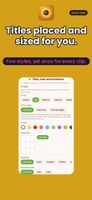
• You never place a title. You write it; NIDIO positions it and sizes it, and keeps it clear of the TikTok and Reels buttons.
• You never align anything. There is no timeline to align on.
• You never fit the music to the clips. NIDIO cuts it to length and balances it against your original sound.
• You never re-crop when you change format. You say what matters in the frame and NIDIO redoes the rest.
• You never write the post description. NIDIO writes it, hashtags included, ready to paste.
WHAT YOU STILL CHOOSE
Five title styles on a nine-position grid, in the color and size you want. Eleven transitions. Eight color looks. Which clips, in which order, with which music. Fast is not the same as decided for you.
SET IT ONCE, NOT CLIP BY CLIP
Title style, color look and transition can be set once from the general panel and apply to every clip. A choice you make on a single clip still wins over the general one — so you set the mood in one move and change one moment when you want to.
TWO CLIPS IN ONE FRAME
Show a before and after in the same shot — side by side or stacked, whichever suits the format.
CHANGE FORMAT WITHOUT REMAKING THE VIDEO
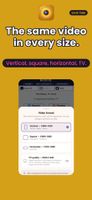
Vertical, square, horizontal, TV quality. For each clip you see four moments from start to end and pick the part that keeps your subject in the picture. The video is not remade: it is re-measured.
YOUR CONTENT IS YOURS
The clips you upload and the videos you export belong to you. We do not use them to train anything, we do not share them and we do not sell them. Delete a memory and it is gone.
FREE
2 exports a month, moments up to 70 seconds, final video up to 5 minutes, 2 GB of storage. Videos exported on the free plan carry a NIDIO watermark.
CREATOR — monthly subscription
60 exports a month, moments up to 190 seconds, final video up to 15 minutes, 20 GB of storage, TV quality 2560x1440, priority support, no watermark. Past the monthly quota you can buy a single extra export.










 EU

 Yanetxys added NIDIO as alternative to CapCut, InShot, KineMaster, VN Video Editor and 9 more
 Yanetxys Torreblanca Enamorado



No comments or reviews, maybe you want to be first?