A beautiful File Manager application built with Flutter.
Overview
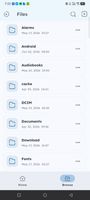
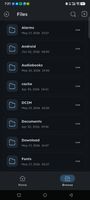
NFile is designed to provide a highly aesthetic file management experience on Android. It features a stunning interface with an exclusive "Broken" icon pack, dynamic AMOLED-friendly dark mode, and a fluid user experience.
With the latest update, NFile transitions from a simple file explorer to a comprehensive media hub with built-in high-performance players and viewers.
Features
Premium UI/UX: A textured and alpha-blended aesthetic that gives a modern, glassmorphic feel to your file browsing.
Native Media Indexing: Lightning-fast gallery views for Images, Videos, and Audio using native device indexing. No more slow recursive scans.
Built-in Media Players:
High-Performance Video Player: Powered by media_kit for smooth playback of high-resolution videos.
Elegant Audio Player: Clean playback interface with album art support and precise seeking.
Pinch-to-Zoom Image Viewer: View your memories in full detail with smooth gestures.
Built-in Text Editor: View and edit .txt, .md, .json, and other code files directly within the app.
Advanced Sorting: Filter your media by Newest, Oldest, or Date-wise to find what you need instantly.
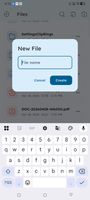
Complete File Operations: Easily copy, cut, paste, rename, and delete files or folders.
Quick Categories: One-tap access to your indexed media libraries.
Storage Overview: Visual representation of your device's internal storage usage.
Fluid UI: iOS-style bouncy physics and smooth transitions throughout the app.









 Paul added NFile as alternative to Prism File Explorer +
 Emin added NFile as alternative to Fossify File Manager, Material Files, Amaze File Manager, MiXplorer and 19 more


No comments or reviews, maybe you want to be first?