


MyPaint
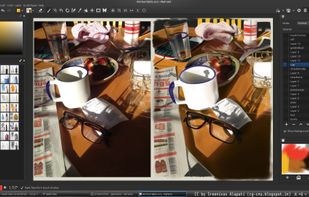
MyPaint is a fast, distraction-free, and easy painting tool for digital artists. It supports graphics tablets made by Wacom, and many similar devices.


Features
Properties
- Distraction-free
- Lightweight
Features
- Sketching
- Support for Layers
- Infinite canvas
- Portable
- Fullscreen support
- Drawing Tablet Support
- Ad-free
- Custom Brushes
- No registration required
- Natural media painting
- Color blending
MyPaint News & Activities
Recent News
Recent activities
 SoftOrbits added MyPaint as alternative to SoftOrbits AI Photo Editor
 brendan-Hancock added MyPaint as alternative to NP Studio Bulk Mockup Generator
 olno5626 added MyPaint as alternative to Make Image Square
 crse added MyPaint as alternative to Kala Paint
- bulldogs liked MyPaint
 vcv added MyPaint as alternative to Specialday.online
 Morchdn added MyPaint as alternative to SpecForm OS
 POX added MyPaint as alternative to PhotoFlare Studio


Featured in Lists

This is going to be a list of the free tools/software that can be used mostly in any field. it's based on websites...

Ever wondering about free great open source software to start your idea? Here's a list for you to get...
How are you? In this list I bring you a variety of alternative software to those from Microsoft, and also that these...
What is MyPaint?
MyPaint is a fast painting program with an emphasis on full-screen use. It lets you focus on the art instead of the program. You work on your canvas with minimum distractions, bringing up the interface only when you need it. MyPaint supports pressure or tilt sensitive graphic tablets and comes with an easy-to-use brush collection. There is a complex interface for creating own brushes, focusing on brush dynamics (changes with speed, pressure, randomly).
MyPaint information
Developed by
 Martin Renold
 Licensing
Open Source (GPL-2.0) and Free product.Written in
Rating
Average rating of 4.5Alternatives
137 alternatives listedSupported Languages
- English

AlternativeTo Category
Photos & GraphicsGitHub repository
- 2,967 Stars
- 449 Forks
- 225 Open Issues
- Updated


Comments and Reviews
My favorite portable digital studio on the planet!
Pretty damn good, actually. I love its clean interface. Great companion to Krita.
One of my favorite portable digital studio on the planet!
Pros: it's simple, fast-starting and the brushes work just as I expect them to. Cons: it's soooo slooow so I'm avoiding the use of some functions 'cause app hangs out. Keyboard shortcuts not working well. Right-click brings window's menu instead of color/brush adjuster.
I'm really impressed by this app. It's very lightway but features all neccessary functions to make impressive artwork. Also the brushes are astounding. The perfect tool to make sketches or paintings with a very flat learning curve.
This app is VERY SPECIFICALLY AIMED AT DRAWING.
This is NOT a general-purpose image editor.
You can't even select an area of an image, and people have been asking for that since 2016.
hands down surpassed all my expectations. so many cool features. can pretty much work entirely in full screen thanks to amazing hotkey tools. example I really like the erase with current brush hot key, this gives your eraser a lot of possibilities. I have 10 brushes hotkeyed and can switch brushsets which means the sky is the limit. brush stroke engine is really nice, might take a little time to learn, but there are many awesome user created brushsets ready-made to choose from download and import. also the join key plus hold shift to make cool twisty 3D-like lines and the ellipses/circle tool, and easy straight lines on the fly. This delivers on so many levels and all for free! and there's even work being done to add perspective: see the forum "Testers wanted: perspective mode (early stages)"
[Edited by snipboyzw, February 02]