
mycam by whoissaaif icon

mycam by whoissaaif

 1 like

MYCAM - Use your phone as a webcam —on Windows & linux plug and play, no Developer Options or ADB.
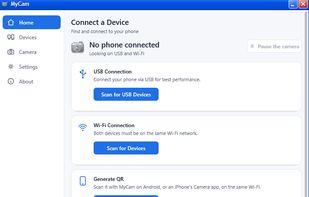
mycam by whoissaaif screenshot 1

Cost / License

  • Free
  • Open Source (MIT)

Since

  • New

Updated

  • Updated Nov 2026

Platforms

  • Windows  exit mycam from the tray if you want to share files across your android and pc
  • Linux
  • Android
  • iPhone
1like
0articles
Save

Features

Features

Highlights All activities

mycam by whoissaaif News & Activities

Recent activities

mycam by whoissaaif information

GitHub repository

  •  22 Stars
  •  2 Forks
  •  0 Open Issues
  •   Updated  
View on GitHub
mycam by whoissaaif was added to AlternativeTo by Saiff on and this page was last updated .

No comments or reviews, maybe you want to be first?

Official Links

What is mycam by whoissaaif?

Why MyCam Plug and play. No Developer Options, no USB debugging, no ADB. Plug in an Android phone over USB, or pair it over Wi-Fi once — either way, Windows just sees a webcam. iPhone and iPad, with nothing to install. The PC itself serves a page; scan a QR code in Safari and you're live. Front and back cameras, real resolutions and frame rates (up to 4K, up to 120 fps where the phone supports it) — MyCam only ever offers what your phone can actually do. Privacy first, by design, not by promise. Pause from the phone, its notification, or the PC tray — instantly, from either side. The camera turns off by itself the moment Windows locks. A PC has to be explicitly allowed by the phone before it gets real video, even once paired — a QR code is consent to pair, not consent to be watched. While paused or not yet allowed, other apps see a "Camera paused" picture, never a frozen or black frame. A free, open-source alternative to proprietary phone-webcam apps, with no ads, no account, no cloud — video only ever goes from your phone to your own PC.

mycam by whoissaaif Videos