

MusicPlayer Pro icon

MusicPlayer Pro

The radio, CD, and cloud music player for Windows with a studio soul: 30,000+ stations, CD playback with online recognition and a spinning turntable, CD ripping to WAV/FLAC, Nextcloud/OneDrive/Dropbox streaming, and real-time metering.
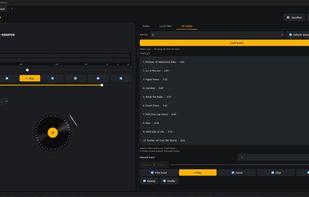
MusicPlayer Pro screenshot 1

Cost / License

  • Pay once
  • Proprietary

Application types

Platforms

  • Windows
0likes
0comments
0articles

Features

Properties

  1.  Lightweight

Features

  1.  No registration required
  2.  Ad-free
  3.  Lossless Audio
  4.  No Tracking
  5.  Radio Player
  6.  Internet Radio
  7.  Now Playing
  8.  Audio Recording

MusicPlayer Pro News & Activities

Highlights All activities

Recent activities

MusicPlayer Pro information

  • Developed by

    Unknown
  • Licensing

    Proprietary and Commercial product.
  • Pricing

    One time purchase (perpetual license) that costs $50.
  • Alternatives

    15 alternatives listed
  • Supported Languages

    • English
    • Italian
    • German

AlternativeTo Categories

Audio & MusicVideo & MoviesCD/DVD Tools
MusicPlayer Pro was added to AlternativeTo by m-pungitore on and this page was last updated .
No comments or reviews, maybe you want to be first?

What is MusicPlayer Pro?

MusicPlayer Pro — Studio Edition is a Windows desktop player built around several sources in one interface: internet radio (30,000+ searchable stations), local music files (organized by album, with large cover art), CD Audio, and music kept on Nextcloud, OneDrive, or Dropbox.

Every source shares the same studio-style PPM meter — the actual signal level in dB, not a made-up animation — plus a 10-band equalizer and bit-perfect stream recording with automatic track splitting by artist/title. Insert an audio CD and the app reads the track list instantly, looks it up online for real titles, artist, album, and cover art, and the meter follows it too — complete with a small animated turntable, tonearm and all, that comes to life while you listen. One click to eject when you're done.

Want to keep a CD in your library? Rip it straight to WAV or FLAC — lossless, no MP3 compression — and when the disc is recognized online, the files come out already named, tagged, and covered, no manual work needed.

Nextcloud, OneDrive, and Dropbox connect the same way you'd expect: Nextcloud with your server address and an app password, OneDrive and Dropbox with a one-click browser login. Once connected, browse and stream your cloud music straight from the app, no downloads.

Rounded out with scheduled recording, ListenBrainz scrobbling, and full Windows integration (media keys, lock-screen cover art, system tray, self-updating). Interface available in English, Italian, and German.