
MT Suite icon
MT Suite icon

MT Suite

 Like

Free Windows software for live view, playback and export of MTechnology video surveillance systems, with third-party cameras via ONVIF.
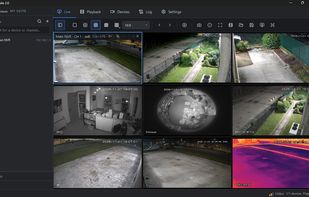
Live view, 3×3 layout (English interface).

Cost / License

  • Freemium (Pay once or Subscription)
  • Proprietary

Since

  • New

Platforms

  • Windows
0likes
0articles
Save

Features

Features

Highlights All activities

MT Suite News & Activities

Recent activities

MT Suite information

  • Developed by

    MTechnology
  • Licensing

    Proprietary and Freemium product.
  • Pricing

    One time purchase and / or subscription + free version with limited functionality.
  • Alternatives

    12 alternatives listed
  • Badge

    Get an embeddable badge for MT Suite
  • Supported Languages

    • English
    • Italian
MT Suite was added to AlternativeTo by MTechnology on and this page was last updated .

No comments or reviews, maybe you want to be first?

What is MT Suite?

MT Suite is free Windows software that installers and system integrators use to manage MTechnology video surveillance systems from a single program.

  • Live view with up to 64 tiles, custom layouts, saved views and a second monitor.
  • Playback with calendar and 4 synchronised tiles; export to MP4 and AVI.
  • Audio listening and talk-back to MTechnology cameras and recorders.
  • Third-party cameras via the ONVIF protocol: live view, events and metadata.
  • Users and roles with per-device and per-channel permissions; password screen lock.
  • Installs without administrator rights; program and installer are digitally signed.
  • English and Italian interface: on first launch MT Suite opens in Italian; select English under Impostazioni → Lingua (Settings → Language), then restart the program.

MT Suite version 2.0.0 is listed in the ONVIF Conformant Products database as a Profile M conformant client.

The core application is free; optional add-on modules, some of them paid, are available through MTechnology installers.

The download is free: enter your email on the vendor's page and the link arrives by email, together with update and security notices.