

mpz icon
mpz icon

mpz

Free, open-source folder player for large local music collections, built in native C++/Qt for Linux, macOS, and Windows.
mpz screenshot 1

Cost / License

Platforms

  • Mac
  • Windows
  • Linux
  • Flathub
  • Flatpak
4likes
0comments
0articles

Features

Properties

  1.  Privacy focused
  2.  Lightweight

Features

  1.  Works Offline
  2.  No registration required
  3.  Ad-free
  4.  Portable
  5.  No Tracking
  6.  Dark Mode
  7.  Lossless Audio
  8.   Support for MPRIS
  9.  Folder-based
  10.  Automatic Lyrics Finder
  11.  Mp3 Tag Editor
  12.  Folder player

mpz News & Activities

Highlights All activities

Recent activities

  • crse updated mpz
  • Fooyin icon
    crse added mpz as alternative to Fooyin
  • crse liked mpz
  • oleg-antonyan updated mpz
  • oleg-antonyan updated mpz
  • foobar2000 icon
    oleg-antonyan added mpz as alternative to foobar2000
  • oleg-antonyan updated mpz
  • oleg-antonyan updated mpz
  • oleg-antonyan liked mpz

mpz information

  • Developed by

    olegantonyan
  • Licensing

    Open Source (GPL-3.0) and Free product.
  • Written in

  • Alternatives

    28 alternatives listed
  • Supported Languages

    • English
    • Russian
    • Serbian
    • Japanese

AlternativeTo Category

Audio & Music

GitHub repository

  •  112 Stars
  •  4 Forks
  •  3 Open Issues
  •   Updated  
View on GitHub
mpz was added to AlternativeTo by Robert on and this page was last updated .
No comments or reviews, maybe you want to be first?

Featured in Lists

in progress Only clone (either 1-to-1 or general function similarity) are included on the list. Artwork by SuperTux …

List by cel with 11 apps, updated

What is mpz?

Free, open-source folder player for large local music collections, built in native C++/Qt for Linux, macOS, and Windows.

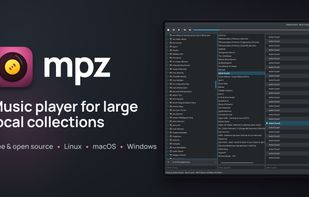
If you organize your music in folders, mpz treats that folder structure as the library — there's no global indexing or database scan before you can play anything. Its signature 3-column layout puts your directory tree, your playlists, and the current track list side by side: middle-click any folder and a playlist is instantly created from it, or drag files and folders straight in from your file manager. The workflow is inspired by Foobar2000's "Album List," but mpz is a native cross-platform player rather than a clone — it keeps the features the author has relied on daily for years.

Local files are the focus (internet radio via m3u/pls streams is supported too), and the app stays fast, lightweight, and follows your desktop theme.

Highlights:

  • Folder-as-library with no indexing step — built for very large collections
  • 3-column UI: directory tree, playlists, tracks; middle-click a folder to make a playlist
  • Gapless playback
  • Multi band and parametric equalizer
  • Internet radio support from raw playlist files and built-in radio library
  • Built-in tag editor (TagLib: ID3v2, Vorbis Comment, MP4, APE)
  • Cover art and lyrics — embedded, .lrc/.txt sidecar, or online (LRCLIB, NetEase, QQ Music, Lyrics.ovh) — in a dialog or dockable panels that follow the playing track
  • CUE sheets
  • Wide format support via system codecs: FLAC, MP3, Ogg Vorbis, Opus, AAC, ALAC, M4A/MP4, WAV, WMA, APE, DSD - OS media integration: MPRIS on Linux (remote control via e.g. KDE Connect), SMTC/taskbar on Windows, Now Playing/Dock on macOS, system tray
  • Global media-key hotkeys and a built-in shortcuts dialog - Per-playlist and global playback order, track sorting presets, playback log
  • mpd (Music Player Daemon) client mode — add an mpd server as a library folder
  • Portable YAML config
  • Free and open source under GPL-3.0