
MonoMap icon
MonoMap icon

MonoMap

A keyboard-first workspace combines mind maps and kanban boards in one browser app. It works offline, stores maps locally without an account, supports Tab, Enter, and Space shortcuts, turns nodes into cards, and exports Markdown, PNG, or JSON for backup.
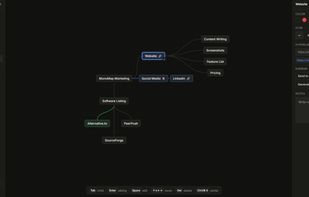
Mind map workspace

Cost / License

  • Freemium (Subscription)
  • Open Source (MIT)

Application type

Platforms

  • Online
1like
0articles
Save

Features

Properties

  1.  Distraction-free
  2.  Lightweight
  3.  Local-First

Features

  1.  Works Offline
  2.  Unlimited storage
  3.  File Versioning
  4.  Ad-free
  5.  Kanban Board
  6.  No Coding Required
  7.  No registration required
  8.  Support for MarkDown
  9.  Keyboard-First
  10.  Mind Mapping

MonoMap News & Activities

Highlights All activities

Recent activities

MonoMap information

  • Developed by

    MK flagTehnika
  • Licensing

    Open Source (MIT) and Freemium product.
  • Pricing

    Subscription ranging between $4 and $8 per month + free version with limited functionality.
  • Written in

  • Alternatives

    12 alternatives listed
  • Badge

    Get an embeddable badge for MonoMap
  • Supported Languages

    • English

AlternativeTo Categories

Office & Productivity, Backup & Sync, Business & Commerce

GitHub repository

  •  1 Stars
  •  0 Forks
  •  1 Open Issues
  •   Updated  
View on GitHub
MonoMap was added to AlternativeTo by petar-petkovski on and this page was last updated .

No comments or reviews, maybe you want to be first?

Official Links

What is MonoMap?

MonoMap is a keyboard-first, local-first mind map and kanban board. It exists to keep you in flow: open it, think, and turn ideas into work — without accounts, menus, or a subscription standing in the way.

  1. You think at the speed of thought: MonoMap opens in about a second and every action lands in under 50 ms. Nodes are created from the keyboard — Tab to branch, Enter for a sibling, Space to rename — so your hands never leave the keys. Ideas get captured at the moment you have them instead of after you find the right menu.

  2. Your ideas stay yours: Most tools put your thinking on someone else's server. MonoMap is local-first: your maps and boards live in your browser and save to your device as you work. There is no account required, no tracking of what you write, and no cloud between you and your notes. When you do want a copy, export Markdown, PNG, or a full JSON profile — your work is never trapped.

  3. One tool, two workspaces: Brainstorming and doing usually live in different apps, so ideas get lost in the gap. MonoMap puts a mind map and a kanban board in one tab with a single toggle. Turn a node into a card, or a whole branch into a board, then jump back and forth in one click. See what a mind map is and what a kanban board is.

  4. Nothing to learn, nothing to configure: There are no plugins to install, templates to pick, or settings to tune before you start. MonoMap does two things and does them well — a deliberate choice against the feature-bloated suite. If you can press Tab, you already know how to use it. See the full feature list.

  5. Free to use, sync only if you want: The app is free, with no board cap and no watermarks. Add Pro only when you want your maps and boards on every device, or Studio when you need version history and read-only share links. No one is forced into a subscription to keep working. Compare options on the pricing page.

  6. It works wherever you do: Because everything is local, MonoMap keeps working on a plane, on a train, or on a bad hotel Wi-Fi. It runs in any modern browser and installs to your phone or desktop, and nothing you create waits on a spinner.