mMDd
1 like
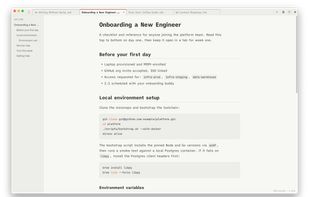
Free, light, and surprisingly capable: a Markdown viewer and editor for macOS and Windows with tabs, live preview, and an outline sidebar.
Features
Properties
- Privacy focused
- Support for Themes
Features
- No registration required
- Syntax Highlighting
- Ad-free
- Live Preview
- Support for MarkDown
- Works Offline
- No Tracking
mMDd News & Activities
Highlights All activities
Recent activities
mMDd information
No comments or reviews, maybe you want to be first?
What is mMDd?
mMDd is a clean, light, and free Markdown editor for macOS and Windows. It started as a simple viewer and grew into a minimal but capable editor — no bloat, no subscription.
Features:
- Obsidian-style tabs with drag-to-reorder, keyboard shortcuts (?1–9), and a right-click menu (Reveal in Finder, Duplicate, Close Others, etc.)
- GFM rendering with syntax-highlighted code blocks
- Split view (editor + live preview) with a draggable divider
- Collapsible outline sidebar for quick navigation in long documents
- Find (?F) and Find & Replace (??F)
- Opens via drag-drop or file association (.md, .markdown, .mdown, .mkd)
- Built-in help and keyboard shortcut guide
mMDd is free to use, with an optional one-time Pro unlock (5 themes + 6 fonts) for readers who want to customize their writing environment. The default Newsprint theme — warm cream paper, vintage red accents, Times serif — is the app's signature look.


