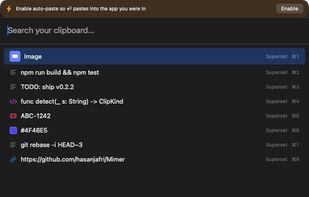
Mimer is a free, open-source (MIT) clipboard manager that lives in the macOS menu bar. Press Shift-Cmd-V to open a command palette over your clipboard history: search as you type (with type:, app:, is:fav and /regex/ filters), then paste, favorite, or transform any clip.
Cmd-K transforms reshape a clip in place with a live preview: case conversion, slugify, Base64/URL encode-decode, JSON pretty-print, JSON to TypeScript interface, JWT decode, line sort/dedupe/reverse, and Unix/ISO-8601 timestamp conversion. Only transforms that apply to the clip are shown.
Mimer understands what you copy: links, code, hex colors (live swatch), git SHAs, issue keys (ABC-123) and file:line references each get their own icon, and Cmd-O opens them where they belong - the commit on your git remote, the issue in your tracker, the file:line in VS Code or Cursor.
Privacy is architectural: history is encrypted at rest (AES-GCM, key in the macOS Keychain), detected secrets (API keys, tokens, private keys) are masked on screen, password managers are never captured, and everything stays local - no account, no cloud, no telemetry.
Also: image clips with thumbnails, a paste-stack (queue clips with Tab, paste them in order with Shift-Enter), snippets, per-app capture exclusions, pause capture, launch at login, and auto-updates via Sparkle. Installable via Homebrew (brew install --cask hasanjafri/tap/mimer) or a notarized DMG. Requires macOS 14+.







No comments or reviews, maybe you want to be first?