

MarkDawn Mind icon
MarkDawn Mind icon

MarkDawn Mind

 Like

MarkDawn Mind is a keyboard-first mind map editor with a familiar Office-style ribbon. Instead of a proprietary format, it saves every map as a plain nested Markdown list, so your maps open in GitHub or Obsidian, and any AI assistant can read them, expand them and give them back...
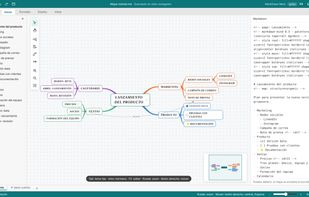
Organic mind map with tapered branches and the live Markdown panel

Cost / License

  • Freemium (Pay once)
  • Open Source (MIT)

Application type

Since

  • New

Updated

  • Updated Nov 2026

Platforms

  • Online
  • Self-Hosted
0likes
0articles
Save

Features

Properties

Features

Highlights All activities

MarkDawn Mind News & Activities

Recent activities

MarkDawn Mind information

  • Developed by

    ES flagDiego Cano
  • Licensing

    Open Source (MIT) and Freemium product.
  • Pricing

    One time purchase (perpetual license) ranging between $16 and $45 + free version with limited functionality.
  • Alternatives

    9 alternatives listed
  • Badge

    Get an embeddable badge for MarkDawn Mind
  • Supported Languages

    • English
    • Spanish

AlternativeTo Category

Office & Productivity

GitHub repository

  •  9 Stars
  •  0 Forks
  •  0 Open Issues
  •   Updated  
View on GitHub

Popular alternatives

View all
MarkDawn Mind was added to AlternativeTo by diegocanodev on and this page was last updated .

No comments or reviews, maybe you want to be first?

What is MarkDawn Mind?

MarkDawn Mind is a keyboard-first mind map editor with a familiar Office-style ribbon. Instead of a proprietary format, it saves every map as a plain nested Markdown list, so your maps open in GitHub or Obsidian, and any AI assistant can read them, expand them and give them back as a map.

Press Tab for a child topic and Enter for a sibling, and the map grows as you type. Topics stay where you drop them, with all their branches, and you can switch between organic, right-side and tree layouts without losing anything.

It is a single HTML file: no installation, no account and no subscription. It runs in Chrome, Edge, Firefox and Safari, and your maps stay on your computer.

The free edition (MIT licence) includes organic tapered branches, several sheets per file, notes, tasks, markers and relations, outline and OPML import, a live Markdown panel, a minimap, dark mode, PNG/JPG export and an English and Spanish interface.

The paid full version adds every map style (hand-drawn, 3D, gold and silver plates, cards...), org chart, timeline and radial layouts, more than 30 shapes, your own drawn shapes, images inside topics, background textures, per-level styles, and high-resolution and SVG export.