
MacOptimizers icon
MacOptimizers icon

MacOptimizers

MacOptimizers is a macOS utility designed as a complete toolbox to help users understand, clean and manage their system more efficiently.
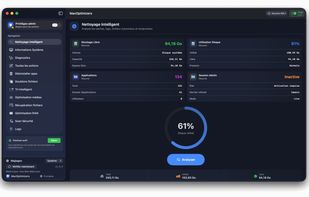
MacOptimizers cleanup module

Cost / License

  • Freemium (Pay once)
  • Proprietary

Application type

Platforms

  • Mac  Compatible with Ventura, Sonoma, Sequoia and Tahoe.
0likes
0comments
0articles

Features

Properties

  1.  Privacy focused

Features

  1.  No Tracking
  2.  AES-256 Encryption
  3.  Delete Temporary Files
  4.  No registration required
  5.  Ad-free
  6.  Photo Recovery
  7.  Command line interface
  8.  Malware Analysis
  9.  File Compression
  10.  Video Converter

MacOptimizers News & Activities

Highlights All activities

Recent activities

MacOptimizers information

  • Developed by

    FR flagInformatique Connect
  • Licensing

    Proprietary and Freemium product.
  • Pricing

    One time purchase (perpetual license) ranging between $8 and $10 + free version with limited functionality.
  • Alternatives

    10 alternatives listed
  • Supported Languages

    • English
    • French
MacOptimizers was added to AlternativeTo by Anthony G on and this page was last updated .
No comments or reviews, maybe you want to be first?

What is MacOptimizers?

MacOptimizers is a macOS utility designed as a complete toolbox to help users understand, clean and manage their system more efficiently.

Unlike traditional “one-click cleaner” apps, MacOptimizers focuses on transparency and control. It helps identify large files, unused data, logs, caches and leftovers, while letting users decide what should actually be removed. The app also includes advanced tools such as deep uninstall (including Homebrew apps), duplicate file detection, smart file organization, and a collection of useful system commands with explanations. Additional features include media utilities (compression, conversion, subtitle tools), file encryption, and a lightweight security scan module.

MacOptimizers runs fully locally, without tracking, background daemons or intrusive alerts. It is designed for both advanced users and curious users who want better visibility and control over their Mac.

