





MacDisplay
1 like
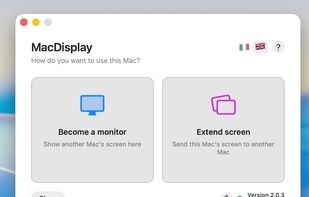
Turn any Mac you already own — even an old iMac — into a true extended second display for your Mac. No dongle, no subscription, no account, no cloud.

Cost / License
- Freemium (Pay once)
- Proprietary
 EU
EUPlatforms
- Mac


Features
MacDisplay News & Activities
Highlights All activities
Recent activities
 ssssaaaa added MacDisplay as alternative to OpenDisplay
 Neville-Gee added MacDisplay as alternative to DeskJoin Screen
 Sharif added MacDisplay as alternative to EasySwitch
- Mariodilionette A comment was removed from MacDisplay
- rated MacDisplay★★★★★
- Mariodilionette liked MacDisplay
 Danilo Venom added MacDisplay as alternative to Side Screen
 Danilo Venom added MacDisplay as alternative to Spacedesk, Deskreen, Duet Display, Screen Stream over HTTP and 9 more
- MacDisplay added MacDisplay


MacDisplay information
Developed by
 Gaetano Andrea Biocca
 Licensing
Proprietary and Freemium product.Pricing
One time purchase (perpetual license) that costs $29 + free version with limited functionality.Alternatives
17 alternatives listedBadge
Get an embeddable badge for MacDisplaySupported Languages

No comments or reviews, maybe you want to be first?