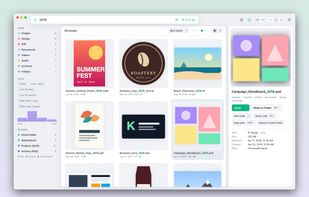
Lupe is a file search app for macOS, built for people who remember files by how they look rather than by their name – designers, photographers, agencies and anyone with large file archives.
Instead of a list of file names, Lupe shows results as a grid of large previews. Type a few letters and results appear instantly: Lupe keeps its own index in memory and searches hundreds of thousands of files in a few milliseconds.
Key features:
• Instant search across your Mac, iCloud Drive, Google Drive and network drives (NAS, SMB/AFP servers)
• Network drives stay searchable even when disconnected – with the last known state and previews
• Large thumbnails, also where macOS gives up: InDesign page previews (no plugin needed), EPS, PSD, AI, TIFF, PDF, RAW, HEIC, videos and everything Quick Look supports
• Filters by kind, date and year – click a bar in the year histogram to see only files from that year, or sort "oldest first"
• Words also match the folder path: "client 2019 logo" finds files even if "client" is only in a folder name
• Right-click any folder in Finder → "Search with Lupe", or search the current Finder selection with ⌥⇧Space
• Bring Lupe up from anywhere with ⌥Space; Space opens a big preview, arrow keys flip through results
• Light and dark mode, English and German interface
Privacy: everything stays on your Mac. No account, no tracking; Lupe only contacts the license server to activate your key.
Native app for macOS 12 or later, Intel and Apple Silicon. One-time purchase of 20 € for up to 3 Macs, including all version 1 updates. No subscription.






 EU


 klinkybill added Lupe as alternative to Find Any File, HoudahSpot, EasyFind, NeoFinder and 6 more

 Andreas Klingenberger


No comments or reviews, maybe you want to be first?