

LRO icon
LRO icon

LRO

Connects devices behind firewalls or NAT with outbound-only agents for local access to remote services using encrypted tunnels. Enables use of SSH, RDP, VNC, web interfaces, or USB-over-IP without port forwarding or VPN. Supports multiple OS, roles, access control, and live tunnel monitoring.
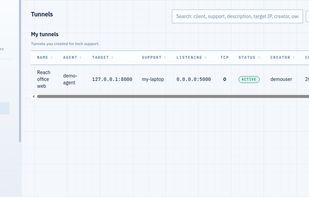
An active tunnel: a service on a remote machine bound to a local port

Cost / License

  • Freemium (Pay once or Subscription)
  • Proprietary

Application type

Platforms

  • Online
  • Software as a Service (SaaS)
0likes
0comments
0articles

Features

Properties

  1.  Lightweight

Features

  1.  End-to-End Encryption
  2.  Ad-free
  3.  Unattended Access
  4.  SSH
  5.  Port Forwarding
  6.  Internet of Things
  7.  No port forwarding required
  8.  Remote Support

 Tags

LRO News & Activities

Highlights All activities

Recent activities

LRO information

  • Licensing

    Proprietary and Freemium product.
  • Pricing

    One time purchase and / or subscription + free version with limited functionality.
  • Alternatives

    9 alternatives listed
  • Supported Languages

    • English
LRO was added to AlternativeTo by Implex on and this page was last updated .
No comments or reviews, maybe you want to be first?

What is LRO?

LRO (Link for Remote Operations) connects two machines that sit behind NAT or a firewall, so you can reach a service on a remote machine as if it were running locally. You install a lightweight agent on each side; both agents connect outbound to the LRO relay, so no inbound ports, port forwarding or router changes are required on either end.

Each agent runs in one of three roles: client - the remote network where the service lives; support - the machine you sit at, where a local listener is opened; or dual, both at once. Once a tunnel is up you point your normal tools at a local port: ssh, an RDP or VNC viewer, a database client, a browser for a router, NAS or IoT web panel, or USB-over-IP for a remote device.

Tunnel traffic is end-to-end encrypted between the two agents with per-tunnel keys, so the relay only ever moves ciphertext it cannot read. Encryption is always on and cannot be turned off. Agents authenticate to the server with a Noise XK handshake and can be revoked or re-keyed per device.

Agents run on Linux, Windows, macOS and Android. There is also an Android SSH terminal with the agent built in, so a phone can open a tunnel and connect to it in one app. Teams and organisations get shared endpoints, per-user permissions and access control, plus live tunnel and traffic monitoring.

Pricing is a low per-agent subscription plus metered traffic, so agents that sit idle cost close to nothing. New accounts start with a free balance, which is enough to install both agents and run a first tunnel before paying.