

Looq
1 like
Adds feature-rich previews to Quick Look including GitHub-style Markdown with KaTeX and Mermaid, syntax highlighting for over 200 languages, sortable tables for CSV/TSV and SQLite, archive and directory browsing, diff file views, and theming options.
Cost / License
- Pay once
- Proprietary
Platforms
- Mac
Features
Properties
- Support for Themes
- Lightweight
- Privacy focused
Features
- Live Preview
- Support for MarkDown
- Built-in viewer
- No Tracking
- Syntax Highlighting
- Works Offline
- Supports Zip files
- Ad-free
- Dark Mode
- Extensible by Plugins/Extensions
- No registration required
- File preview
Looq News & Activities
Highlights All activities
Recent activities
Looq information
No comments or reviews, maybe you want to be first?
What is Looq?
Looq extends Finder's Quick Look with rich preview capabilities for every file type. Press Space on any file to instantly preview it with beautiful, native rendering.
MARKDOWN PREVIEW
- GitHub Flavored Markdown with tables, task lists, and alerts
- KaTeX math formulas and Mermaid diagrams
- Auto-generated table of contents with active heading highlight
- Emoji shortcodes, syntax-highlighted code blocks with copy button
- TextBundle support
SOURCE CODE HIGHLIGHTING
- 200+ programming languages with syntax highlighting
- Auto language detection from file content and shebang lines
- Auto-formatting for JSON, CSS, JavaScript, XML, and more
- Optional line numbers, word wrap, and custom tab width
DATA FORMAT PREVIEWS
- CSV/TSV rendered as native tables with sortable columns
- SQLite databases with table switching and column metadata
- Diff/Patch files with color-coded additions and removals
ARCHIVE & DIRECTORY BROWSER
- Browse ZIP, TAR, GZ, BZ2 contents without extracting
- Directory tree with sortable columns and file metadata
FULLY CUSTOMIZABLE
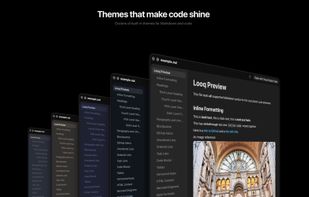
- Independent light and dark themes
- Custom fonts, sizes, and weights for both Markdown and code
- Scroll position memory across previews
- Remote image caching for Markdown files
- Configurable metadata bar showing file size, dates, and type
Built natively for macOS. No new app to manage, just a better Quick Look experience right in Finder.


