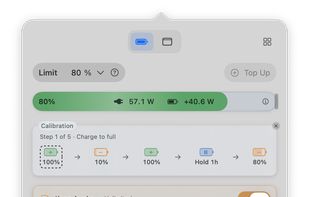
Liwu is a menu bar app with small tools for Apple silicon MacBooks. Set a charging target from 80% to 100%, or as low as 20% on Macs where Liwu confirms low-target support, and save named presets for the targets you switch between. The battery bar shows adapter input and battery power separately, so you can see whether the battery is actually charging.
Keep Awake holds off system sleep for long builds, downloads and local AI agents while the display sleeps, with an optional timer and low-battery cutoff. The Menu Bar page sorts the icons you rarely use into a Hidden group and an Always Hidden group; arrows in the menu bar show or hide the Hidden group in one click.
Battery Health records maximum capacity and cycle count once a day and charts them over time. Optional notifications tell you when calibration ends, when a plan does not run, when Keep Awake turns itself off, or when charging control needs attention. Liwu also warns you when Optimized Battery Charging is turned back on.
All of the above is free. Liwu Pro is a one-time purchase of $9.99 with no subscription, and adds:
- Top Up: request 100% for a trip while keeping your regular target. It ends when you unplug or turn it off.
- Sailing: hold a range, not one exact level. The battery drops 5 to 20 points below your limit before recharging.
- Battery calibration: a guided five-step cycle that returns to your regular target.
- Plans: set a target, start Top Up or start calibration on a schedule (once, daily, weekly, biweekly or monthly).
- Keep Awake with the lid closed.
Targets below 80% are held by the Mac's firmware and use raw battery capacity, so the percentage macOS shows can differ by a few points. Liwu has no usage telemetry; settings and battery readings stay on your Mac. The app is signed and notarized.
Requires an Apple silicon MacBook on macOS 26.7 or later. Liwu 1 remains available for macOS 14 through versions before 26.7.







 Li-Li added Liwu as alternative to AlDente, Battery Toolkit, BatFi and Charge Limiter


No comments or reviews, maybe you want to be first?