LighterMac icon
LighterMac icon

LighterMac

LighterMac opens up the “System Data” your Mac won't explain and tells you, item by item, what each thing is and what happens if you delete it (“Xcode rebuilds it on the next build”, “this may be your only copy”).
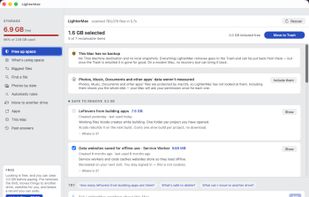
Free up space: every item says what it is, what happens if you remove it, and when you last used it. Cleared items go to the Trash, never straight to deletion.

Cost / License

  • Freemium (Pay once)
  • Proprietary

Application type

Platforms

  • Mac
0likes
0articles
Save

Features

Properties

  1.  Privacy focused
  2.  Lightweight

Features

  1.  No Tracking
  2.  Works Offline
  3.  No registration required
  4.  Delete Temporary Files
  5.  Ad-free
  6.  Software Uninstallers

LighterMac News & Activities

Highlights All activities

Recent activities

LighterMac information

  • Developed by

    Cosmovex
  • Licensing

    Proprietary and Freemium product.
  • Pricing

    One time purchase (perpetual license) that costs $10 + free version with limited functionality.
  • Alternatives

    27 alternatives listed
  • Badge

    Get an embeddable badge for LighterMac
  • Supported Languages

    • English
LighterMac was added to AlternativeTo by Cosmovex-Apps on and this page was last updated .

No comments or reviews, maybe you want to be first?

What is LighterMac?

LighterMac opens up the “System Data” your Mac won't explain and tells you, item by item, what each thing is and what happens if you delete it (“Xcode rebuilds it on the next build”, “this may be your only copy”).

It only ever suggests clearing what rebuilds itself — photos, documents and apps are never suggested. Everything goes to the Trash first with a list to put it back, and it measures the space you really got back instead of promising it.

It also uninstalls apps with the leftovers they hide (dragging Docker to the Trash leaves 16 GB behind), finds leftovers of apps deleted long ago, and moves big files you still need to another drive, leaving a link so nothing breaks.

Native Swift, 3 MB, notarised. Runs entirely on your Mac: no account, no analytics in the app. Free to scan everything and clear 2 GB; Pro is a one-time purchase.