Ledor is an open-source speed reader for EPUB books and web articles, built with Flutter and available for Android, Linux desktop and iOS (built from source).
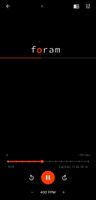
Instead of moving your eyes across the line, Ledor uses RSVP (Rapid Serial Visual Presentation): one word at a time in a fixed position, at a speed you choose. Each word is aligned on its Optimal Recognition Point (ORP) — the letter your eye naturally fixates on — highlighted in a contrasting color, so you read without saccades.
Three reading modes, switchable at any time and remembered per book:
• RSVP — single-word display with ORP highlight
• E-reader — traditional continuous text
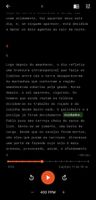
• TTS — text-to-speech narration with word-synced highlighting, background playback and lockscreen controls
Pausing RSVP or TTS drops you into the full text with the current word highlighted, so you never lose your place. Tap any word to jump there and continue.
Other features:
• Import EPUB files, or save any web article by URL (or through the Android share sheet)
• Smart timing: longer pauses on punctuation, paragraph and chapter starts, and long words, plus a gentle ramp-up at the start of each session
• Bookmarks with context snippets and a chapter-aware progress slider
• Reading stats with weekly and monthly charts, a shareable monthly recap image, and a book-completion screen with star ratings
• Fully customizable reader: colors, fonts, sizes, layout positions and focus line, with light and dark editorial themes
• Optional Google Drive sync for library, progress, bookmarks and settings, using the drive.file scope so the app only ever sees its own files
• Offline-first: books and progress are stored locally in SQLite
• Bilingual interface: English and Brazilian Portuguese
• MIT licensed, no ads and no account required











 Daniel Pimenta


No comments or reviews, maybe you want to be first?