
Sheets to labels icon

Sheets to labels

Label printing software for Google Sheets, Excel, CSV, Avery-compatible sheets, barcodes, QR labels, and print-ready PDFs.
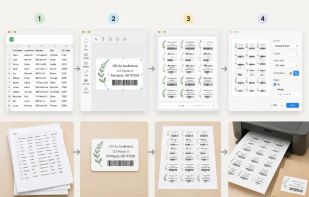
Label designer workflow

Cost / License

  • Freemium (Pay once or Subscription)
  • Proprietary

Platforms

  • Mac  The Mac desktop app currently supports Apple Silicon Macs. The web app works on Mac browsers.
  • Online  Runs in a modern web browser. No installation required.
  • Chrome OS
  • Google Chrome
  • Software as a Service (SaaS)  Cloud-based web app with free usage and paid export credits or subscriptions.
0likes
0comments
0articles

Features

Properties

  1.  Lightweight
  2.  Privacy focused

Features

  1.  No registration required
  2.  Ad-free
  3.  No Tracking
  4.  Works Offline
  5.  Dark Mode
  6. Google Sheets icon  Google Sheets integration
  7.  Barcode Generator
  8.  Mail Merge

Sheets to labels News & Activities

Highlights All activities

Recent activities

Sheets to labels information

  • Developed by

    US flagsheetstolabels
  • Licensing

    Proprietary and Freemium product.
  • Pricing

    One time purchase ranging between $15 and $99, and / or subscription ranging between $9 and $99 per month + free version with limited functionality.
  • Alternatives

    10 alternatives listed
  • Supported Languages

    • English
    • German
    • Esperanto
    • French
    • Italian
    • Polish
    • Russian
    • Chinese
    • Japanese
    • North Ndebele
    • Korean

AlternativeTo Category

CD/DVD Tools
Sheets to labels was added to AlternativeTo by markhoma mark on and this page was last updated .
No comments or reviews, maybe you want to be first?

What is Sheets to labels?

SheetsToLabels is a spreadsheet-first label maker for turning Google Sheets, Excel, CSV, or pasted rows into print-ready labels. It supports address labels, shipping labels, product tags, barcode labels, QR labels, asset tags, name badges, Avery-compatible sheets, A4 and US Letter layouts, thermal labels, and custom paper sizes.

Users can import spreadsheet data, map columns to label fields, design labels with a visual editor, preview the full sheet layout, adjust margins and gaps, choose where printing starts on a partially used sheet, and export print-ready PDF files. SheetsToLabels works in the browser and also offers a Mac app, Chrome extension, Edge add-on, and Google Workspace add-on for spreadsheet-based label workflows.

Key Features

  • Import from Google Sheets, Excel, CSV, or pasted rows
  • Create address labels, shipping labels, product labels, asset labels, barcode labels, QR labels, and name badges
  • Avery-compatible layouts such as 5160, 8160, 5163, L7160, and custom label sheets
  • Visual drag-and-drop label designer
  • Spreadsheet field mapping and mail merge-style label generation
  • Full sheet preview before printing
  • A4, US Letter, thermal roll, and custom paper sizes
  • Print-ready PDF export
  • Chrome, Edge, Google Workspace, web app, and Mac app options

Sheets to labels Videos

Show 2 more videos

Official Links
