kubeNimbus icon
kubeNimbus icon

kubeNimbus

 Like

Free, open-source native Kubernetes desktop client that opens on the applications needing attention. No telemetry, no account.
kubeNimbus screenshot 1

Cost / License

  • Free
  • Open Source (MIT)

Since

  • New

Updated

  • Updated Oct 2026

Platforms

  • Mac  Apple Silicon only; not notarized, so the first launch needs Open Anyway.
  • Linux
  • Windows
0likes
0articles
Save

Features

Highlights All activities

kubeNimbus News & Activities

Recent activities

kubeNimbus information

AlternativeTo Categories

Development, Network & Admin

GitHub repository

  •  6 Stars
  •  0 Forks
  •  47 Open Issues
  •   Updated  
View on GitHub
kubeNimbus was added to AlternativeTo by DmNetDev on and this page was last updated .

No comments or reviews, maybe you want to be first?

Official Links

What is kubeNimbus?

kubeNimbus is a free, MIT-licensed Kubernetes desktop client for Windows, macOS and Linux. It is compiled ahead of time with .NET NativeAOT and Avalonia, so it is a native app rather than an Electron one, with no runtime to install.

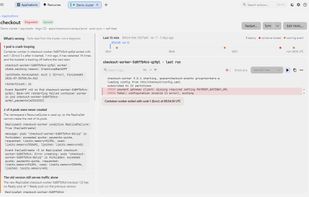
It opens on Applications: every Argo CD application, and every workload Argo does not track, with a health verdict and a one-line reason read from the cluster's own status. One step further are the facts behind the verdict, the pods, a timeline of the last hour and the crashing pod's logs.

It also has live resource lists for every kind the cluster serves, custom resources included, a list across several clusters, pod logs with search and previous-container logs, a real terminal for exec, port-forwarding, YAML editing with server-side apply behind a dry-run preview, CPU and memory from metrics-server, read-only Helm releases, Argo CD sync and refresh, and an RBAC review. It reads your existing kubeconfig, including exec-plugin sign-in for EKS, GKE and AKS.

It sends no telemetry, needs no account and connects only to the clusters you open. A built-in demo cluster lets you try it without one.

On Windows it installs from the Microsoft Store or with winget. The macOS build is for Apple Silicon and is not notarized.