Klass Personal OS icon

Klass Personal OS

Klass Personal OS is a native Mac app that runs Claude or Codex on a schedule, or the moment an email, text message, feed item, or file arrives, so the work happens whether or not a chat is open.
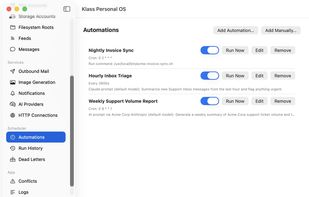
Automations that run on a schedule or when something happens

Cost / License

  • Freemium (Pay once)
  • Proprietary

Platforms

  • Mac  Requires macOS 14 Sonoma or later
0likes
0articles
Save

Features

Properties

Features

 Tags

Highlights All activities

Klass Personal OS News & Activities

Recent activities

Klass Personal OS information

  • Developed by

    US flagCorey Klass
  • Licensing

    Proprietary and Freemium product.
  • Pricing

    One time purchase (perpetual license) ranging between $69 and $99 + free version with limited functionality.
  • Alternatives

    6 alternatives listed
  • Badge

    Get an embeddable badge for Klass Personal OS
  • Supported Languages

    • English

AlternativeTo Categories

Office & Productivity, AI Tools & Services

Popular alternatives

View all
Klass Personal OS was added to AlternativeTo by KlassyCoder on and this page was last updated .

No comments or reviews, maybe you want to be first?

What is Klass Personal OS?

Klass Personal OS is a native Mac app that runs Claude or Codex on a schedule, or the moment an email, text message, feed item, or file arrives, so the work happens whether or not a chat is open.

Each assistant gets its own API key, scoped to the specific mail accounts, folders, calendars, and actions you choose, and writing to mail stays off until you turn it on. Outgoing email can wait for your approval before it sends.

Everything is set up in a normal macOS settings window, with no JSON files, Node, or Python to install. It works with Claude Desktop (one-click install), Claude Code, Codex, and any MCP client, and includes tools for email, calendar, contacts, reminders, files and Obsidian notes, cloud storage, and more.

Automations can also run on your own self-hosted AI models through Ollama or any OpenAI-compatible server, so a job's data never has to go to a cloud AI.

Synced data stays on your Mac and passwords stay in the Keychain. The free tier has no time limit and includes three automations; Pro is a one-time license.
