KinetAios icon
KinetAios icon

KinetAios

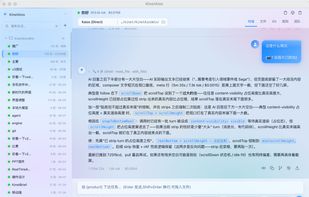
KinetAios is a desktop AI agent dashboard for Windows 11 and macOS. Run multiple agent sessions concurrently and switch between three engines per conversation:

KinetAios screenshot 1

Cost / License

Platforms

  • Mac
  • Windows
2likes
0comments
0articles

Features

Properties

  1.  Local-First
No features, maybe you want to suggest one?

KinetAios News & Activities

Highlights All activities

Recent activities

KinetAios information

  • Developed by

    CN flagphinn
  • Licensing

    Open Source (GPL-3.0) and Free product.
  • Written in

  • Alternatives

    7 alternatives listed
  • Supported Languages

    • English
    • Chinese
    • Japanese

AlternativeTo Category

AI Tools & Services

GitHub repository

  •  1 Stars
  •  0 Forks
  •  0 Open Issues
  •   Updated  
View on GitHub
KinetAios was added to AlternativeTo by kinet on and this page was last updated .
No comments or reviews, maybe you want to be first?

What is KinetAios?

KinetAios is a desktop AI agent dashboard for Windows 11 and macOS. Run multiple agent sessions concurrently and switch between three engines per conversation:

  • Direct (Kaios) — the built-in ReAct loop calling the provider of your choice (GLM, OpenAI-compatible, Anthropic-compatible).
  • Claude Code — spawns claude -p --output-format stream-json, resumes with --resume.
  • Codex — spawns codex exec --json, resumes by session id.

Each session has its own model picker, working directory, attached files, and skill selection. Tools include shell, read_file, write_file, web_fetch, recall_memory, and dispatch_agent (nested sub-agents). Full MCP (Model Context Protocol) support: any MCP server configured in ~/.claude.json, ~/.codex/config.toml, or Claude Desktop is auto-discovered and exposed as Direct-engine tools.

All history, conversations, and long-term memory live in a local SQLite database with FTS5. Memory extraction runs in the background — durable facts about you are pulled from each turn and injected into the next session. Nothing leaves your machine except the API calls you explicitly make to your chosen LLM provider.

Other things: global hotkey, system tray, configurable product name (white-label friendly), no telemetry, no account.

Official Links