




Keboard
2 likes
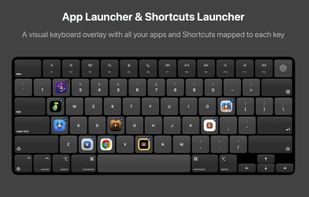
Floating macOS keyboard enables app and shortcut binding to any key, features customizable trigger key, theme and animation options, live previews for show and hide effects, quick access to automation workflows, single-tap AI tool launching, and Dock-free app launch.

Cost / License
- Pay once
- Proprietary
Application type
Platforms
- Mac


Features
Highlights All activities
Keboard News & Activities
Recent activities
 SuperCommands added Keboard as alternative to SuperCommands
- Paul added Keboard as alternative to Clippy for macOS
- Paul added Keboard as alternative to Clipped for macOS
- Ben liked Keboard
- Tintin Yuan liked Keboard


Developed by
 baqiwl
 Licensing
Proprietary and Commercial product.Pricing
One time purchase (perpetual license) that costs $10.Alternatives
58 alternatives listedBadge
Get an embeddable badge for KeboardSupported Languages


No comments or reviews, maybe you want to be first?