
Kagi Mail icon
Kagi Mail icon

Kagi Mail

 Like

Private email and calendar service with custom domains, unlimited aliases and 50 GB storage. It blocks trackers, screens new senders and warns about phishing, while optional AI organizes mail, surfaces follow-ups and answers questions with linked source emails.
Kagi Mail screenshot 1

Cost / License

  • Subscription
  • Proprietary

Application type

Since

  • New

Platforms

  • Online
0likes
0articles
Save

Features

Properties

Features

Highlights All activities

Kagi Mail News & Activities

Recent activities

Kagi Mail information

  • Developed by

    US flagKagi
  • Licensing

    Proprietary and Commercial product.
  • Pricing

    Subscription that costs $99 per year.
  • Alternatives

    48 alternatives listed
  • Badge

    Get an embeddable badge for Kagi Mail
  • Supported Languages

    • English
Kagi Mail was added to AlternativeTo by Paul on and this page was last updated .

No comments or reviews, maybe you want to be first?

What is Kagi Mail?

A private email and calendar with a @kagimail.com address, or with your own domains.

To deliver the experience we believe in, we built the full stack: hosting for your addresses and domains, plus the mail and calendar apps. It runs on open standards and open-source infrastructure (the Stalwart server, IMAP, JMAP, and CalDAV), so you can use Kagi’s apps or any compatible client you already like.

The basics:

  • A @kagimail.com address
  • Unlimited aliases
  • Unlimited domains
  • Built-in Calendar
  • 50 GB of storage

Intelligence:

  • Organize your mail in your own words. Brief it the way you’d brief an assistant: “Label anything where beta users send product feedback. It might come from @kagimail.com, but use judgment.” You decide what permissions each rule gets (read the content, or skip the inbox).
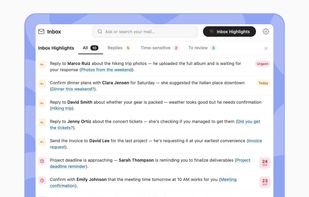
  • Inbox Highlights show what needs you today, and learn from what you dismiss.
  • Ask your inbox in plain language and get direct answers with the source email, including text inside scanned PDFs and photos.
  • Newsletter view reads newsletters like a feed, out of the way of real mail.
  • Responsible AI, with one switch to turn it all off. You control what AI is allowed to do and infer.

Private by default

  • Tracking pixels and remote images are blocked or proxied, so senders can’t tell when or where you opened their mail.
  • Sender screening holds new senders until you approve them, so they never reach your inbox uninvited.
  • Suspicious senders trigger a phishing warning, while verified senders show their (BMI) logo.
  • No ads, ever. No profiling, no selling, no sharing your data.

For teams and families

  • Shared addresses on your domain (team@, info@, family@): create an alias, then choose which people have access to it
  • Sign in through a social login, or your organization’s own identity provider (OIDC)
  • Coming soon: Shared mailboxes

Kagi integration

  • Kagi Translate is built in
  • Email Assistant: Write to assistant@kagimail.com for answers about your mail (actions coming soon)
  • Proofread and translation included while you write emails

For power users and developers

  • Keyboard-first: command palette, shortcuts, and search operators
  • Rule-based filtering with Sieve, no AI involved
  • MCP server with read access to your mail
  • Works with Apple Mail, Thunderbird, and any IMAP/JMAP/CalDAV client, with automatic setup