ImageForge - Freeware Edition icon

ImageForge - Freeware Edition

Offers image and photo editing tools with support for painting, layers, photo effect filters, custom brushes, and natural media. Allows image import from TWAIN devices, creation of photo albums, animations, slide shows, 3D shapes, web art, and screen savers.
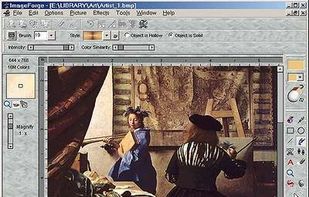
STANDARD - Image Editing Windows Allow Easy Access to Painting Tools and Functions

Cost / License

  • Freemium
  • Proprietary

Alerts

  • Discontinued

Platforms

  • Windows
Discontinued

The latest version is from 2012.

1like
0comments
0articles

Features

ImageForge - Freeware Edition News & Activities

Highlights All activities

Recent activities

ImageForge - Freeware Edition information

  • Developed by

    CursorArts Company
  • Licensing

    Proprietary and Freemium product.
  • Pricing

    free version with limited functionality.
  • Alternatives

    132 alternatives listed
  • Supported Languages

    • English

AlternativeTo Category

Photos & Graphics
ImageForge - Freeware Edition was added to AlternativeTo by nbendala on and this page was last updated .
No comments or reviews, maybe you want to be first?

What is ImageForge - Freeware Edition?

  • ImageForge Standard Freeware Edition:

ImageForge provides you with a set of powerful tools for painting and editing images, photos or other graphics.Create and edit images, acquire pictures from your scanner, digital camera or other Twain-compliant device, apply special effect filters, produce your own photo albums and simple slide shows, and much more.

  • ImageForge PRO:

Create Your Own Illustrations, Pictures, Photo Albums and Image Libraries, Animations, and Web Art Images. Merge images, create 3D titles and shapes, remove red-eye and other imperfections from photos, apply special effects filters, use custom brushes and natural media (watercolors, oil paint, etc.), produce your own animations (.GIF, .AVI, etc.), make your own web art, and much more.

  • ImageForge GOLD:

Convert images from one format to another, acquire images from scanners and digital cameras, Create and manipulate image layers, Merge images using different effect filters and transparency, create 3D titles and shapes, remove red-eye and other imperfections from photos, apply special effects filters, use custom brushes and natural media (watercolors, oil paint, etc.), produce your own animations (.GIF, .AVI, etc.), make your own web art and screen savers, and much more. Includes support for: mulitple image layers; floating tool palette and preview window; new selection tools; new shadow options; new gradients and transparency controls; and much more