





Ice Menu Bar
30 likes
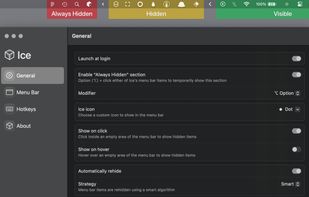
Offers detailed control for macOS menu bar items by organizing sections, hiding or revealing icons on hover or click, and customizing appearance with tint, gradients, shadows, borders, shapes, hotkeys, launch options, and frequent automatic updates.

Platforms
- Mac


Discontinued
The latest beta version (0.11.13) is from September 2025, and it seems it's not actively developed anymore.

Features
Ice Menu Bar News & Activities
Highlights All activities
Recent activities
- bearygarcia liked Ice Menu Bar
- Danilo Venom updated Ice Menu Bar
 innsoul added Ice Menu Bar as alternative to ChocolateBar
 Charles Snow added Ice Menu Bar as alternative to Tuck Menu Bar
- Raphty commented on Ice Menu Bar
Ice really seems to be not working so well anymore, I switched to Thaw, a fort of Ice still activley developed. Thaw
- miracles liked Ice Menu Bar
- wouf336 updated Ice Menu Bar
 wouf336 added Ice Menu Bar as alternative to Thaw
- smallplanet liked Ice Menu Bar
- MohammadAzeem Wani commented on Ice Menu Bar
Recently it has been crashing on macOS 26


Featured in Lists


The macOS setup for everyone (with freeware only)
THIS LIST HAS BEEN DELETED DUE TO A BUG, SO IT MISSES SOME HONORABLE MENTIONS !
This is the apps for macOS that I would recommend to anyone who just got a Mac !
Some are the default that Apple offers but I tried to offers you free alternative to escape Apple Wall Garden if you need or want to
The same list for
Windows 10 & Windows 11 :
Linux kernel (GUI apps only) :
What is Ice Menu Bar?
Ice Menu Bar information
Developed by
 Jordan Baird
 Licensing
Open Source (GPL-3.0) and Free product.Written in
Rating
Average rating of 4.2Alternatives
8 alternatives listedBadge
Get an embeddable badge for Ice Menu BarSupported Languages

AlternativeTo Category
OS & UtilitiesGitHub repository
- 29,726 Stars
- 965 Forks
- 438 Open Issues
- Updated


Comments and Reviews
Has a lot of cool features, but the background CPU usage for it was just too much of a trade off. Pretty much a constant 2-22% drain on an M4 Max.
Ice really seems to be not working so well anymore, I switched to Thaw, a fort of Ice still activley developed. Thaw
Thaw
Recently it has been crashing on macOS 26
I like it. You can reduce the sidebar and first of all you can keep some features without hiding everything. To conclude it's 100% free and open source !
Open source, prestine and works. 6/10 Can't believe people pay for software like this.
Laughable people pay for bartender when this exists
Free and open source, actively developed. It allows a split menu bar, and has a secondary floating bar coming soon to support notch macbooks,