
holzBar icon
holzBar icon

holzBar

holzBar keeps the Mac's menu bar tidy: icons you rarely need are collapsed and come back on a click, hover or scroll. It is a fork of Ice by Jordan Baird, carried on for macOS 14 to 27 with a backend for the redesigned macOS 27 menu bar.
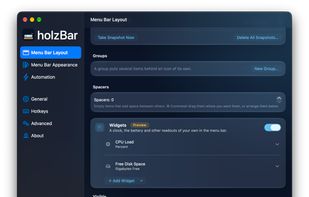
Menu Bar Layout: drag items between the visible and hidden sections, with groups, spacers and (Preview) widgets such as CPU load and free disk space.

Cost / License

Application type

Platforms

  • Mac  Requires macOS 14 Sonoma or later; runs on macOS 27.
0likes
0articles
Save

Features

Properties

Features

Highlights All activities

holzBar News & Activities

Recent activities

holzBar information

GitHub repository

  •  7 Stars
  •  0 Forks
  •  1 Open Issues
  •   Updated  
View on GitHub

Popular alternatives

View all
holzBar was added to AlternativeTo by holz on and this page was last updated .

No comments or reviews, maybe you want to be first?

Official Links

What is holzBar?

holzBar keeps the Mac's menu bar tidy: icons you rarely need are collapsed and come back on a click, hover or scroll. It is a fork of Ice by Jordan Baird, carried on for macOS 14 to 27 with a backend for the redesigned macOS 27 menu bar.

Features: hidden and always-hidden sections, the holzBar Shelf (a bar below the menu bar for the hidden icons, also on Macs with a notch), a drag-and-drop layout, a search that finds and opens any menu bar item, profiles, groups and spacers, hotkeys, tint, shadow, border and rounded shapes, a black menu bar, Zen mode, URL commands, Shortcuts actions, and settings export and import.

Principles: it never connects to the network (no update checks, telemetry or analytics), has no third-party dependencies, is a single executable without helper processes, and is installed and updated through Homebrew. The interface is available in English, German, French, Italian and Romansh.

The beta releases add automation rules, scripts and menu bar widgets as previews.