


Heynote
19 likes
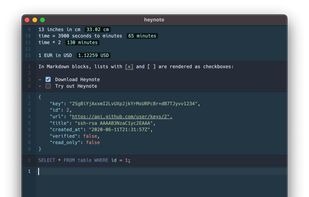
Block-organized, privacy-focused scratchpad for developers with language-specific syntax highlighting and auto-formatting, supporting JavaScript, JSON, Markdown, notes, API responses, and daily planning, all in a persistent local buffer with minimalist interface.

Cost / License
- Free
- Open Source
Application typeApplication types
 EU
EUPlatforms
- Mac
- Windows
- Linux

Features
Heynote News & Activities
Highlights All activities
Recent News
No news, maybe you know any news worth sharing?
Share a News Tip
Recent activities
 DavidBoissevain added Heynote as alternative to Fyka Notes
 Simon R added Heynote as alternative to Study Focus
 Paul added Heynote as alternative to xnotes and Wisp for macOS
- Danilo Venom updated Heynote
 Paul added Heynote as alternative to SpeedyNote




Heynote information
Developed by
 Jonatan Heyman
 Licensing
Open Source and Free product.Written in
Alternatives
69 alternatives listedBadge
Get an embeddable badge for HeynoteSupported Languages

AlternativeTo Categories
Development, Office & Productivity, Business & CommerceGitHub repository
- 5,372 Stars
- 292 Forks
- 92 Open Issues
- Updated


Comments and Reviews
Nifty! Pretty similar to Calca and Soulver (Mac). Only wish you could save documents, but maybe that will come later?