
GreenOrb Statistics icon

GreenOrb Statistics

Self-hosted visitor statistics for WordPress. Your analytics data is stored in your own database, and bot traffic is filtered, flagged and itemised.
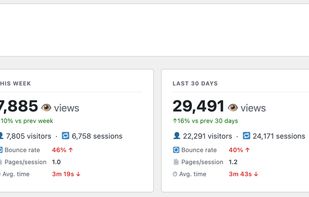
GreenOrb Statistics screenshot 1

Cost / License

  • Freemium (Pay once or Subscription)
  • Open Source (GPL-2.0)

Platforms

  • Wordpress
0likes
0articles
Save

Features

Properties

  1.  Privacy focused

Features

  1.  Ad-free

GreenOrb Statistics News & Activities

Highlights All activities

Recent activities

GreenOrb Statistics information

AlternativeTo Category

Network & Admin
GreenOrb Statistics was added to AlternativeTo by paj389 on and this page was last updated .

No comments or reviews, maybe you want to be first?

What is GreenOrb Statistics?

GreenOrb Statistics is a WordPress plugin that records page views, visitors and sessions and shows the reports inside your WordPress dashboard. The data is stored in your own WordPress database. It is not sent to an outside analytics service, and no outside service is needed to show the reports.

The free version covers page views, unique visitors, sessions, bounce rate and engaged time on page, which stops counting shortly after a tab goes idle. It also reports referrers and UTM campaigns, devices and browsers, country and city, popular content, entry and exit pages, clicks on elements you choose, and scheduled email reports. Any report can be exported to CSV.

Known bots are filtered out using the open-source Matomo bot list. A daily scan flags likely bots that got past the filters and lists them, so you can see what your traffic is made of.

You can anonymise IP addresses, choose how long raw data is kept, and run the plugin with zero cookies. It works with consent plugins that support the WP Consent API, such as Complianz, and it adds a section to the WordPress privacy policy guide that matches your settings.

GreenOrb Statistics Pro adds WooCommerce revenue and funnel reports, goals and conversions, Core Web Vitals, form tracking, traffic spike alerts and Ask AI. Ask AI is off by default. When you turn it on, it sends summary figures, not visitor records, to an AI service so you can ask questions about your stats in plain English.
