


Celluloid
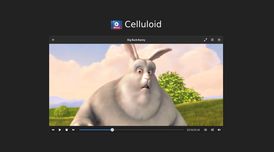
Celluloid (formerly GNOME MPV) is a simple GTK+ frontend for mpv. Celluloid interacts with mpv via the client API exported by libmpv, allowing access to mpv's powerful playback capabilities.


Features
Properties
- Lightweight
- Privacy focused
Features
- Gtk
- No registration required
- Works Offline
- Dark Mode
- Ad-free
- Support for 4K
- No Tracking
Celluloid News & Activities
Recent News
- Fla published news article about Celluloid
 Celluloid v0.29 update fixes Nvidia GPU issues and enhances interface controls
Celluloid new v0.29 update resolve multiple issues, including flickering or black screens for Nvidi...
- POX published news article about Celluloid
 Celluloid 0.28 released with UI redesign, Lua modules support, F10 key binding, and more
Celluloid, a straightforward GTK+ video player built on MPV, has launched version 0.28, bringing a ...
- POX published news article about Celluloid
 Celluloid 0.27 released with improved floating-mode user interface and faster launch times
Celluloid, the simple and modern GTK frontend for the media player mpv, has rolled out version 0.27...


Recent activities
- Occytan liked Celluloid
 Explore_Future added Celluloid as alternative to Gaoji Stream Inspector
- c17s5qhu reviewed Celluloid
Simple but very reliable and sleek. Stable and light.
- c17s5qhu liked Celluloid
 OrdinaryPerson added Celluloid as alternative to mpvExtended
 robert-timsah added Celluloid as alternative to Serene Video


Featured in Lists

A list with 117 apps by RemovedUser without a description.

Choose freedom and continued democracy by switching away from big tech in your personal digital lives. Not all apps …

This is a list of my favorite Linux programs (GUI / CLI) that I use daily. Not all of these apps are Linux exclusive.
What is Celluloid?
Celluloid (formerly GNOME MPV) is a simple GTK+ frontend for mpv. Celluloid interacts with mpv via the client API exported by libmpv, allowing access to mpv's powerful playback capabilities.
Celluloid interacts with  MPV via the client API exported by libmpv, allowing access to mpv's powerful playback capabilities. Celluloid can be configured using the preferences dialog accessible via the "Preferences" menu item. Additional configuration options can be set from an external file using the same syntax as mpv's mpv.conf. See mpv's man page for the full list of options. The file must be specified and enabled in the preferences dialog under the "MPV Configuration" section.
Options can also be set using the "Extra MPV Options" text box in the preferences dialog. The syntax used is the same as mpv's command line options.
Lua Scripts
Celluloid can use most mpv Lua scripts as-is. Some Lua scripts may define keybindings that conflict with GNOME MPV, in which case you'll need to resolve the conflict by explicitly defining new keybindings using input.conf. See mpv's manual for more details.
Lua scripts can be installed by switching to the Lua Scripts tab in the preferences dialog and dropping script files there. A list of mpv Lua scripts can be found here.
Keybindings
Celluloid defines a set of keybindings in the macro DEFAULT_KEYBINDS, which can be found in src/def.h. The syntax used is exactly the same as mpv's input.conf. These keybindings are applied on top of default keybindings provided by mpv.
Additional keybindings can be defined in an external file using mpv's input.conf syntax. The file can be set in the preferences dialog under the "Keybindings" section.
Celluloid information
Developed by
UnknownLicensing
Open Source (GPL-3.0) and Free product.Written in
Rating
Average rating of 5Alternatives
62 alternatives listedNews
3 news article related to CelluloidSupported Languages
- English

AlternativeTo Categories
Video & Movies, Audio & MusicGitHub repository
- 1,390 Stars
- 106 Forks
- 280 Open Issues
- Updated


Comments and Reviews
This is the best video player in linux. While SMPlayer could not play a video due to reading header error and unrecognizable format error, this app played it well. Celluloid supports wayland and has playlist feature. Also I like its fast launch speed.
Simple but very reliable and sleek. Stable and light.