
Ghostman icon
Ghostman icon

Ghostman

 Like

Ghostman is a lightweight, keyboard-first terminal API studio built for developers who are tired of bloated 1GB+ Electron API clients that force cloud accounts.
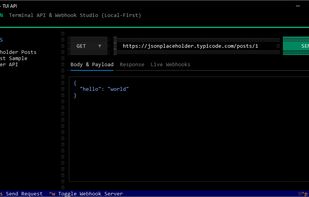
Ghostman screenshot 1

Cost / License

  • Free
  • Open Source (MIT)

Since

  • New

Updated

  • Updated Oct 2026

Platforms

  • Windows
  • Mac
  • Linux
  • Python
0likes
0articles
Save

Features

Properties

Features

Highlights All activities

Ghostman News & Activities

Recent activities

Ghostman information

AlternativeTo Categories

OS & Utilities, Development

GitHub repository

  •  2 Stars
  •  0 Forks
  •  0 Open Issues
  •   Updated  
View on GitHub
Ghostman was added to AlternativeTo by 4yk5 on and this page was last updated .

No comments or reviews, maybe you want to be first?

Official Links

What is Ghostman?

Hi everyone,

Like many developers, I got frustrated with what happened to Postman: it turned from a simple dev tool into a 1GB+ Electron app that forces cloud accounts, team workspaces, and telemetry just to test an endpoint.

So I built Ghostman — a lightweight, keyboard-first terminal API studio that respects your system and privacy.

Why use Ghostman over Postman?

  1. RAM & Startup:
  • Postman: Uses 800MB - 1.5GB RAM, slow to start.
  • Ghostman: Takes ~40MB, starts in under 200ms right in your terminal.
  1. Cloud & Privacy:
  • Postman: Pushes your collections to the cloud, requires login.
  • Ghostman: 100% Local-First. Collections live in plain YAML (.ghostman/collections.yaml) inside your repo. Commit it to Git with your team. Zero accounts, zero tracking.
  1. Built-in Webhook Receiver (The Killer Feature):
  • Postman: Testing incoming webhooks (Stripe, GitHub, Discord) requires setting up external tunnels (ngrok) or web mock tools.
  • Ghostman: Hit Ctrl+W and it instantly spins up a local receiver on port 9090. Incoming HTTP callbacks show up live on your screen.
  1. Keyboard-Driven Workflow:
  • Complete requests, inspect formatted JSON responses, and view latency telemetry (ms) without taking your hands off the keyboard.

It is 100% open source under the MIT License (screenshots in the repo): https://github.com/4yk5/Ghostman

If you find it useful, feel free to give it a star or share your feedback!