GhostDeck icon
GhostDeck icon

GhostDeck

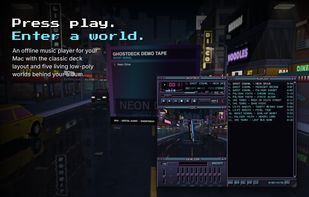
GhostDeck plays the music files you already own, on a Mac, without an account or an internet connection. The layout is the classic one from the late nineties: a main deck with LED time, spectrum and transport buttons, a ten band equalizer with presets, and a playlist.
GhostDeck screenshot 1

Cost / License

  • Pay once
  • Proprietary

Application type

Platforms

  • Mac
0likes
0articles
Save

Features

Properties

  1.  Lightweight
  2.  Support for Themes

Features

  1.  Lossless Audio
  2.  Works Offline
  3.  No registration required
  4.  No Tracking
  5.  Ad-free
  6.  Playlists

GhostDeck News & Activities

Highlights All activities

Recent activities

GhostDeck information

  • Developed by

    RS flagDjordje Janjic
  • Licensing

    Proprietary and Commercial product.
  • Pricing

    One time purchase (perpetual license) ranging between $4 and $6.
  • Alternatives

    7 alternatives listed
  • Badge

    Get an embeddable badge for GhostDeck
  • Supported Languages

    • English

AlternativeTo Category

Audio & Music
GhostDeck was added to AlternativeTo by Djordje Janjic on and this page was last updated .

No comments or reviews, maybe you want to be first?

Official Links

What is GhostDeck?

GhostDeck plays the music files you already own, on a Mac, without an account or an internet connection. The layout is the classic one from the late nineties: a main deck with LED time, spectrum and transport buttons, a ten band equalizer with presets, and a playlist. The three are separate windows that snap together like magnets and move as one, and you can pick a pixel scale from 1x to 4x to fit your screen.

Below the deck there is a 3D pane. The album cover becomes a jewel case that turns slowly while the track plays, floating over one of five low-poly worlds that react to the music: a synthwave grid, a moonlit forest with real reflections, dunes with a chrome skull, a rainy neon city, and a deep sea. Each world gives the deck its own colour scheme, and a hue slider lets you shift any of them.

Supported formats are MP3, AAC and M4A, FLAC, Apple Lossless, WAV, AIFF, CAF and AC3. Playlists load and save as M3U. Drop files or folders on any window to add them. Embedded artwork, or a cover image next to the track, is used for the case.

The app is written in Swift and Metal with its own renderer, no game engine or web view. Almost all textures and worlds are generated on the Mac when it starts, so the app is about 12 MB. It runs in the macOS sandbox, only sees the folders you open, and has no analytics or network access. Media keys and the Now Playing widget work as usual.

One time purchase on the Mac App Store, all worlds included, no subscription and no in-app purchases. Requires macOS 14 or later, Apple silicon or Intel.
