


Gemini CLI
Open-source terminal AI connects to development tools, understands and edits code, generates, explains, and refactors using natural language, automates complex workflows, executes shell commands, grounds interactions with search, and supports extensibility via protocols and prompts.
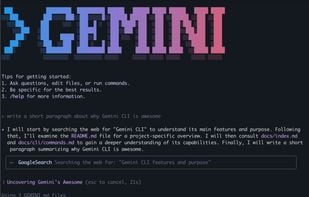

Features
- Command line interface
- Support for scripting
- Tui
- AI-Powered
- Code generation
- Terminal-based
- Model Context Protocol (MCP) Support
- Context-aware help
- Shell integration
Tags
- gemini-api
- AI Agent
- code-refactory
- Developer Tools
- command-line-tool
- gemini-client
- gemini
- ai-agent-platform
- gemini-ai
- natural-language-interface
Gemini CLI News & Activities
Recent News
- Fla published news article about Google Gemini
 Gemini 3 Flash launches in CLI with lower cost and top agentic coding scores
Gemini 3 Flash is now available in Gemini CLI, bringing high-frequency workflow support and preview...
- Maoholguin published news article about Jules
 Google unveils Jules for Gemini CLI, bringing autonomous coding tasks to the terminal
Google has launched the Jules extension for Gemini CLI, adding an autonomous coding assistant that ...
- Maoholguin published news article about Gemini CLI
 Google launches Gemini CLI Extensions with public GitHub ecosystem and major partners
Google has launched extensions for Gemini CLI, opening its command-line AI tool to third-party inte...


Recent activities
 HappyGamerGoose added Gemini CLI as alternative to Amp Code
 HappyGamerGoose added Gemini CLI as alternative to Factory
 AmariahAK added Gemini CLI as alternative to Atlarix
- Gohikan liked Gemini CLI
 shichiroh-shigeh added Gemini CLI as alternative to Cognix
- ktreharrison liked Gemini CLI
 Shaggai added Gemini CLI as alternative to ShaggAi
- K0RR added Gemini CLI as alternative to howto
 lamjed001 added Gemini CLI as alternative to Verdent
- chriscthomas liked Gemini CLI



What is Gemini CLI?
A command-line AI workflow tool that connects to your tools, understands your code and accelerates your workflows.
Gemini CLI is Google’s open-source AI agent for the terminal, powered by the  Google Gemini 2.5 Pro model. It enables natural language interactions directly in the command line, allowing developers to generate, explain, debug, and refactor code, execute shell commands, and perform content or research tasks without leaving their terminal.
The tool offers real-time grounding via Google Search, supports scripting and automation, and is fully extensible through the Model Context Protocol (MCP) and custom prompt files. It’s free to use with generous limits via a Google account and integrates with Gemini Code Assist for consistent workflows across terminal and IDE environments.
With the Gemini CLI you can:
- Query and edit large codebases in and beyond Gemini's 1M token context window.
- Generate new apps from PDFs or sketches, using Gemini's multimodal capabilities.
- Automate operational tasks, like querying pull requests or handling complex rebases.
- Use tools and MCP servers to connect new capabilities, including media generation with Imagen, Veo or Lyria
- Ground your queries with the Google Search tool, built in to Gemini.
Gemini CLI information
Developed by
 Google
 Licensing
Open Source (Apache-2.0) and Free product.Written in
Alternatives
46 alternatives listedNews
5 news article related to Gemini CLISupported Languages
- English

AlternativeTo Categories
Development, OS & Utilities, AI Tools & ServicesGitHub repository
- 94,357 Stars
- 11,151 Forks
- 2095 Open Issues
- Updated


Comments and Reviews
Very helpful to code with