G-Helper icon
G-Helper icon

G-Helper

 13 likes

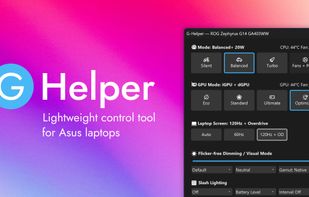
Small executable tool for Asus laptops providing advanced and customizable power modes, seamless GPU switching, fan curve editing, lighting control, temperature monitoring, hotkeys, battery protection, and integrated automation features for device management.
G-Helper screenshot 1

Cost / License

Since

  • Since 2024 (updated Nov 2026)

Releases

  • 17 releases last year17 last year

GitHub

  • GitHub stars: 16.2k

Platforms

  • Windows
13likes
0articles
Save

Features

Properties

Features

Highlights All activities

G-Helper News & Activities

Recent News

No news, maybe you know any news worth sharing?

Share a News Tip

Recent activities

  • MJ Web liked G-Helper
  • MJ Web reviewed G-Helper  

    Excellent lightweight alternative to Armoury Crate. Uninstalled Armoury and replaced it with G-Helper on my ROG G14 a year ago and haven't looked back.

  • Boreas icon
    yusuf-yonturk added G-Helper as alternative to Boreas
  • Sparks Starlight added No Tracking as a feature to G-Helper
  • Sparks Starlight added No registration required as a feature to G-Helper
  • Sparks Starlight reviewed G-Helper  

    Simple, lightweight, and it works well on my Asus ROG GZ302E. I couldn't find the setting to turn off the back light in ArmouryCrate and that kept trying to shove wallpaper at me, but this let me set what I want and be done.

  • Sparks Starlight liked G-Helper
  • Netkuszkusz liked G-Helper
  • ALTERRA updated G-Helper
  •  Coreboard icon
    Winner-AKPADJA added G-Helper as alternative to Coreboard

Comments and Reviews

   
Top Positive Comment
NejyCR
4

A better, open source version of Armory Crate. The fan speed-temperature customizable curve is top tier.

MJ Web
0
Managing Director

Excellent lightweight alternative to Armoury Crate. Uninstalled Armoury and replaced it with G-Helper on my ROG G14 a year ago and haven't looked back.

Sparks Starlight
0
Sparks Starlight Solutions LLC

Simple, lightweight, and it works well on my Asus ROG GZ302E. I couldn't find the setting to turn off the back light in ArmouryCrate and that kept trying to shove wallpaper at me, but this let me set what I want and be done.

Review from a new or low-activity account — shown here, but not counted in the app rating.
3Nya3
1

Very customizable and does what armoury crate does

Featured in Lists

Windows Handheld Compendium

If you just got a Windows-based handheld like e.g: Lenovo Legion Go, ASUS ROG Ally, MSI Claw, or you're just looking for apps that would make your Windows gaming experience more convenient, then you have found the right place!
By Zari3739 appsUpdated

Official Links

Install from the command line

  • winget install -e --id seerge.g-helper

Be careful what you paste into a terminal. Check what a command installs before running it.

What is G-Helper?

Small and lightweight Armoury Crate alternative for Asus laptops offering almost same functionality with much smaller footprint.

Works with all popular models, such as ROG Zephyrus G14, G15, G16, M16, Flow X13, Flow X16, Flow Z13, DUO, TUF Series, Strix or Scar Series, ProArt, Vivobook, Zenbook, ROG Ally or Ally X and many more!

Advantages

  • Seamless and automatic GPU switching
  • All performance modes can be fully customized with power limits and fan curves
  • Lightweight. Doesn't install anything in your system. Just a single exe to run
  • Simple and clean native UI with easy access to all settings
  • FN-Lock and custom hotkeys

Main Features

  • Performance: Silent - Balanced - Turbo (built-in, with default fan curves)
  • GPU modes: Eco - Standard - Ultimate - Optimized
  • Screen refresh rate and Display overdrive
  • Custom fan curve editor, power limits and turbo boost selection for every performance mode
  • Anime Matrix or Slash Lighting control including animated GIFs, clock and Audio visualizer
  • Backlight animation modes and colors
  • Hotkey handling
  • Monitor CPU and GPU temperature, fan speeds and battery status
  • Battery charge limit to preserve battery health
  • NVidia GPU overclocking and undervolting
  • XG Mobile Control
  • AMD CPU Undervolting
  • BIOS and Driver Updates
  • Asus Mice settings
  • Mini-led multi-zone switch
  • Flicker-free dimming and Visual Modes

Performance Modes

  • Silent in BIOS + Best power efficiency power mode
  • Balanced in BIOS + Balanced power mode
  • Turbo in BIOS + Best performance power mode

Automation

  • Performance Mode switching when on battery or plugged in
  • Optimized GPU mode - disables dGPU on battery and enables when plugged in
  • Auto Screen refresh rate (60Hz on battery and max Hz when plugged)
  • Keyboard backlight timeout on battery or when plugged in

GPU Modes

  • Eco : only low power integrated GPU enabled, iGPU drives built in display
  • Standard (MS Hybrid) : iGPU and dGPU enabled, iGPU drives built in display
  • Ultimate: iGPU and dGPU enabled, but dGPU drives built in display (supported on 2022+ models)
  • Optimized: disables dGPU on battery (Eco) and enables when plugged in (Standard)

G-Helper Videos

Show 5 more videos

G-Helper information

AlternativeTo Categories

OS & Utilities, System & Hardware

GitHub repository

  •  16,155 Stars
  •  698 Forks
  •  143 Open Issues
  •   Updated  
View on GitHub

Our users have written 4 comments and reviews about G-Helper, and it has gotten 13 likes.

G-Helper was added to AlternativeTo by Remych04 on and this page was last updated . G-Helper is sometimes referred to as GHelper.