
Boreas icon
Boreas icon

Boreas

 Like

Open source Armoury Crate alternative for ASUS laptops on Linux: performance modes with their own fan curves, power limits and CPU temperature target, GPU modes, Aura lighting and battery charge limit.
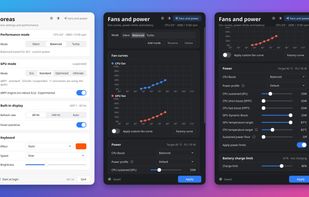
Main window in the light theme (performance mode, GPU mode, display, keyboard) next to Fans and power in the dark theme: per-mode fan curves, power limits, CPU temperature target and battery charge limit.

Cost / License

Since

  • New

GitHub

  • GitHub stars: 3

Platforms

  • Linux
0likes
0articles
Save

Features

Highlights All activities

Boreas News & Activities

Recent activities

Boreas information

  • Developed by

    Yusuf Yontürk
  • Licensing

    Open Source (GPL-3.0) and Free product.
  • Written in

  • Alternatives

    5 alternatives listed
  • Badge

    Get an embeddable badge for Boreas
  • Supported Languages

    • English
    • Turkish
    • Hindi
    • Spanish
    • Arabic
    • French
    • Russian
    • German
    • Japanese
    • Chinese
    • Portuguese

AlternativeTo Category

OS & Utilities

GitHub repository

  •  3 Stars
  •  0 Forks
  •  11 Open Issues
  •   Updated  
View on GitHub
Boreas was added to AlternativeTo by yusuf-yonturk on and this page was last updated .

No comments or reviews, maybe you want to be first?

Official Links

What is Boreas?

Armoury Crate alternative for ASUS laptops on Linux. One small window and one system service in place of asusd, supergfxd and rog-control-center.

Made for ROG and TUF laptops (Zephyrus, Strix, Scar, Flow, TUF Gaming). Boreas has no model list: it reads what the kernel offers, so on other ASUS laptops such as Zenbook, Vivobook and ProArt it shows the settings that are there and hides the rest.

Advantages

  • Every mode is a full preset: fan curves, power limits, CPU boost and CPU temperature target change together
  • Set a CPU temperature (75-95 °C) instead of watts, and Boreas moves the power limits to hold it
  • Easy to undo: on first start it adopts your current settings and writes nothing to the hardware, and the uninstaller brings asusd, supergfxd and power-profiles-daemon back
  • No account, no ads, no telemetry; the tray only asks GitHub for the latest release, and that can be turned off
  • Window, tray menu, Fn+F5 and a command-line tool (boreasctl)

Main features

  • Performance modes: Silent, Balanced, Turbo and your own custom modes
  • Custom fan curves for the CPU, GPU and mid fans, per mode
  • CPU power limits (SPL, SPPT, FPPT), NVIDIA Dynamic Boost and GPU temperature target, per mode
  • GPU modes: Eco, Standard, Optimized and Ultimate (MUX switch)
  • Aura keyboard lighting: static, breathe, cycle, rainbow, strobe, per-key effects, zone colors, and a color that follows CPU temperature, GPU mode or battery level
  • Battery charge limit
  • Panel overdrive and refresh rate
  • CPU and GPU temperature, fan speeds and battery status at a glance

Automation

  • Switch mode when the charger is plugged in or unplugged
  • Optimized GPU mode: the NVIDIA GPU is off on battery and on when plugged in

Interface in 11 languages, light and dark theme. The hardware support comes from the asus-wmi and asus-armoury kernel drivers of the asus-linux.org community.