🔗What is frp?
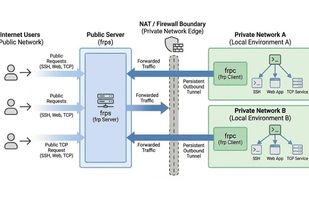
frp is a fast reverse proxy that allows you to expose a local server located behind a NAT or firewall to the Internet. It supports TCP, UDP, HTTP, and HTTPS protocols, enabling requests to be forwarded to internal services via domain name.
🔗Key Features:
• P2P Connect Mode: Allows direct peer-to-peer connections.
• Protocol Support: Supports TCP, UDP, HTTP, and HTTPS.
• Security: Offers encryption and compression for secure data transmission.
• Load Balancing: Supports load balancing for high availability.
• Health Checks: Ensures service reliability with health check features.
• Custom Domains: Allows custom domain names for internal web services.
• URL Routing: Supports forwarding HTTP requests to different backend services.
• Plugins: Extensible with built-in and custom plugins for rich features.
• Virtual Network: Enables IP-level routing between machines.
• Feature Gates: Allows enabling or disabling experimental features.
🔗Configuration:
• Files: Supports TOML, YAML, and JSON formats.
• Environment Variables: Can be referenced in configuration files.
• Split Configurations: Allows splitting proxy configs into different files.
• Dynamic Proxy Management: Enables creating, updating, and deleting proxies at runtime.
🔗Authentication:
• Token Authentication: Uses a shared token for authentication.
• OIDC Authentication: Supports OpenID Connect for secure authentication.
🔗Security:
• Encryption and Compression: Ensures secure and efficient data transmission.
• TLS: Supports TLS for secure connections.
• HTTP Basic Auth: Requires HTTP Basic Auth for web services.
• Proxy Protocol: Supports Proxy Protocol to send user's real IP to local services.
🔗Monitoring and Management:
• Dashboard: Provides a web interface to check frp's status and proxies' statistics.
• Client Admin UI: Helps manage frpc's configuration and proxies.
• Prometheus: Supports Prometheus for monitoring and metrics collection.
🔗Example Usage:
• Accessing Internal Web Services: Expose a local web service behind a NAT network.
• Forwarding DNS Queries: Forward DNS queries to a public DNS server.
• Exposing Unix Domain Sockets: Expose a Unix domain socket as TCP.
• Enabling HTTPS: Enable HTTPS for a local HTTP service.
• Private Service Exposure: Expose services privately using a preshared key.




 Samiul-Sk added frp as alternative to Expose CLI
 GHostly added frp as alternative to Ghostly Share
 duanlab added frp as alternative to NPS Enhanced





 fatedier



No comments or reviews, maybe you want to be first?