FluentClipper icon
FluentClipper icon

FluentClipper

Small, fast clipboard manager for Windows 10/11: history, templates in folders, abbreviations, sync through any cloud folder.
Clips

Cost / License

  • Free
  • Proprietary

Application type

Platforms

  • Windows
3likes
0articles
Save

Features

Properties

  1.  Privacy focused
  2.  Lightweight

Features

  1.  Cloud Sync
  2.  Full-Text Search
  3.  Ad-free
  4.  Portable
  5.  Dark Mode
  6.  No Tracking
  7.  No registration required
  8.  Works Offline
  9.  Snippets
  10.  Text Expansion

FluentClipper News & Activities

Highlights All activities

Recent activities

FluentClipper information

  • Developed by

    DmitryN71
  • Licensing

    Proprietary and Free product.
  • Alternatives

    12 alternatives listed
  • Badge

    Get an embeddable badge for FluentClipper
  • Supported Languages

    • English
    • German
    • Chinese
    • Spanish
    • Italian
    • French
    • Portuguese

AlternativeTo Category

Office & Productivity

Our users have written 1 comments and reviews about FluentClipper, and it has gotten 3 likes

FluentClipper was added to AlternativeTo by Dmitry_N on and this page was last updated .

Comments and Reviews

   
GlebSmith
0

Look nice, lots of useful functions

Review from a new or low-activity account — shown here, but not counted in the app rating.

What is FluentClipper?

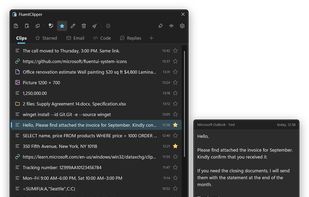
FluentClipper is a small, fast clipboard manager for Windows 10 and 11. It remembers everything you copy (formatted text, links, pictures, files and folders) and pastes it back with a hotkey. For the texts you need every day there are templates, sorted into tabs and folders, and abbreviations that expand them as you type.

Press Win+Alt+V and the window opens at your text cursor: type a couple of letters to search, press Enter, and the clip is pasted where you were typing. Shift+Enter pastes it as plain text, Ctrl+1 to Ctrl+0 paste one of the first ten clips.

Clipboard history

  • Formatted text from Word, Outlook and browsers, links, pictures, files and folders. Copying the same thing again moves the old clip to the top instead of making a duplicate.
  • Search by text, by the app a clip came from, by date in a calendar and by kind. Starred clips are never cleaned up.
  • A preview card shows the whole clip; a picture gets all the free room next to the window.
  • Several clips can be pasted together, in the order you picked them, with formatting and pictures.
  • Quick paste of an older or newer clip with a hotkey, like Alt+Tab.
  • Ctrl+Shift+Insert pastes the clipboard as plain text in any app.

Templates and abbreviations

  • As many template tabs as you like, each with its own icon and hotkey, and folders inside a tab.
  • Espanso-style abbreviations: type \sig in any app and get your signature. The keyboard layout doesn't matter.
  • Export all templates to Excel, edit names, tabs, folders and abbreviations there, and import them back.
  • Sync templates and starred clips between computers through a folder of any cloud: OneDrive, Google Drive, Dropbox, Synology Drive or a network drive.

Also

  • F2 edits formatted text on a white page: tables, bold, lists, links.
  • Text copied from dark-themed pages is pasted without the dark background.
  • Passwords from password managers are not recorded, and any app can be excluded.
  • Light and dark themes and menus in the Windows 11 style, sharp at any display scale.
  • A portable version that keeps everything next to the program.
  • Interface in English, Russian, German, French, Spanish, Italian, Portuguese and Chinese.
  • One native .exe: no .NET, starts instantly. No account, no ads, no telemetry; it goes online only to check GitHub for a new version, and that can be turned off.