




Floodtide
2 likes
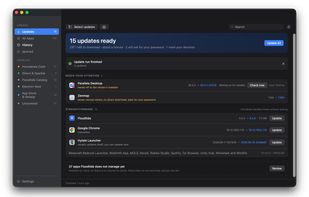
Floodtide is a Mac app updater designed as a modern alternative to MacUpdater. It scans the apps installed on your Mac, checks multiple update sources, and lets you update outdated apps from one place.

Cost / License
- Freemium (Pay once)
- Proprietary
Application type
Platforms
- Mac



Features
Floodtide News & Activities
Highlights All activities
Recent activities
- Realm-6701 added Privacy focused as a feature to Floodtide
- Realm-6701 added Works Offline as a feature to Floodtide
- Realm-6701 added Lightweight as a feature to Floodtide
- Realm-6701 liked Floodtide
- Ben liked Floodtide
- Realm-6701 updated Floodtide
 Mauricio B. Holguin added Floodtide as alternative to Updatest, Latest, Version Tracker and MacUpdater
- Realm-6701 added Floodtide
- Mauricio B. Holguin updated Floodtide


Floodtide information
Developed by
 bhopstudio
 Licensing
Proprietary and Freemium product.Pricing
One time purchase (perpetual license) that costs up to $27 + free version with limited functionality.Alternatives
4 alternatives listedBadge
Get an embeddable badge for FloodtideSupported Languages


No comments or reviews, maybe you want to be first?