
Flashback Instant Replay icon

Flashback Instant Replay

 Like

Free, lightweight instant replay for Windows 11. One hotkey saves the last moments as an MP4. No account to record, no ads.
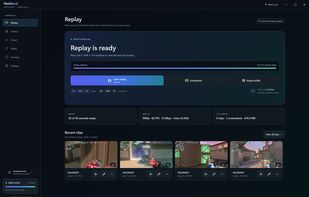
Replay page: the rolling buffer, save and screenshot shortcuts, and recent clips

Cost / License

  • Freemium (Subscription)
  • Proprietary

Application type

Since

  • Since 2026

Platforms

  • Windows  Windows 11 (64-bit) only; needs a graphics card with a hardware video encoder.
0likes
0articles
Save

Features

Properties

Features

Highlights All activities

Flashback Instant Replay News & Activities

Recent activities

Flashback Instant Replay information

AlternativeTo Category

Video & Movies
Flashback Instant Replay was added to AlternativeTo by Rique on and this page was last updated .

No comments or reviews, maybe you want to be first?

Official Links

What is Flashback Instant Replay?

Flashback is a free instant replay recorder for Windows 11 that waits quietly in the tray. Press Ctrl+Shift+F10 and the last 30 seconds save as an MP4, already filed by game. It records with your graphics card's hardware encoder (H.264, HEVC or AV1) and captures the display instead of hooking into the game. In a published July 2026 Cyberpunk 2077 benchmark it cost 5.9% of average FPS with 238.9 MiB of memory (method and raw data on the Flashback website's benchmark page). Recording, screenshots, the trim editor, montages, Discord-sized copies and offline voice commands are free and need no account; the app has no ads. Optional Flashback Cloud sharing is a paid plan.