





Fileside
4 likes
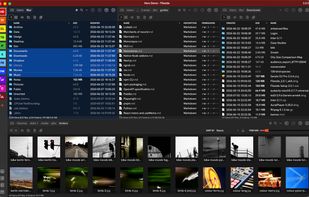
Fileside is a modern file manager for Mac and Windows with a twist. Create workspaces for your projects — build layouts of your folders. Everything you need will never be more than a click away, and staying organised becomes a breeze.

Cost / License
- Pay once
- Proprietary
Application typeApplication types
 EU
EUPlatforms
- Mac
- Windows


Features
Fileside News & Activities
Highlights All activities
Recent activities
- Erik J updated Fileside
 Paul added Fileside as alternative to Captain's Deck
- kamoltuk2001 liked Fileside


Fileside information
Developed by
 Fileside
 Licensing
Proprietary and Commercial product.Pricing
One time purchase (perpetual license) that costs $40.Alternatives
18 alternatives listedBadge
Get an embeddable badge for FilesideSupported Languages


Featured in Lists


Native applications for macOS
A list with 45 apps by caiocco without a description.


macos apps
Here is a list of good macOS apps.
Free & Open Source: Audacity, Blender, Chromium, Docker, Drawio, Firefox, Homebrew, Jellyfin, KeePassXC, LibreOffice, LuLu, OBS, qBittorrent, UTM, VirtualBox, VLC, VSCode, Wireshark.
Free & Closed Source: Affinity Studio, Apple Dictionary, Discord, GarageBand, Sublime Text.
Pay and Closed Source: Anual payment ($2673) + One payment ($2327)
AutoCAD: $2,030
Audirvana Studio: $76
Adobe Photoshop/Lightroom: $240
Capture One: $327
Ableton: $600
Alfred: $45
Bartender: $28
Bitwig: $87
Final Cut Pro: $385
Cleanshot X: $29
Eagle: $30
Little Snitch: $65
Macfamilytree: $50
Parallels: $190
Photomator Pro: $80
Pixelmator Pro: $50
Procreate: $13
Sketch: $12
Transmit: $45
WiFi Explorer: $20
No comments or reviews, maybe you want to be first?