
File Acture icon
File Acture icon

File Acture

Offline toolbox for PDFs, images and archives on Mac and Windows: compress PDFs to an exact size, convert HEIC, remove backgrounds. Nothing is uploaded.
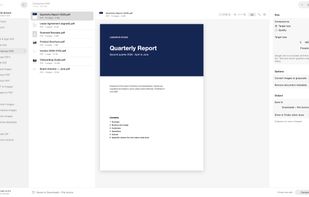
File Acture compressing a PDF to an exact target size (5 MB) on Mac

Cost / License

  • Freemium (Pay once)
  • Proprietary

Platforms

  • Windows  Windows 10 version 1809 or later, 64-bit.
  • Mac  macOS 14 Sonoma or later.
0likes
0articles
Save

Features

Properties

  1.  Privacy focused

Features

  1.  Remove Image Background
  2.  PDF compression
  3.  No registration required
  4.  Supports Zip files
  5.  Ad-free
  6.  Dark Mode
  7.  Sign PDF files
  8.  Combine PDF
  9.  Built-in viewer
  10.  Batch Editing
  11.  Split PDF files
  12.  PDF encryption
  13.  OCR
  14.  Works Offline
  15.  Image Optimizer
  16.  PDF OCR
  17.  Image Conversion
  18.  Batch processing

File Acture News & Activities

Highlights All activities

Recent activities

File Acture information

  • Developed by

    TR flagMahir Gündüz
  • Licensing

    Proprietary and Freemium product.
  • Pricing

    One time purchase (perpetual license) ranging between $29 and $30 + free version with limited functionality.
  • Alternatives

    10 alternatives listed
  • Badge

    Get an embeddable badge for File Acture
  • Supported Languages

    • English
    • Turkish
    • German
    • Spanish
    • French
    • Italian
    • Portuguese
    • Russian
    • Japanese
    • Korean
    • Chinese
    • Arabic
    • Hindi
File Acture was added to AlternativeTo by MahirGunduz on and this page was last updated .

No comments or reviews, maybe you want to be first?

What is File Acture?

File Acture is a desktop toolbox for PDFs, images and archives on Mac and Windows. Drop files in and get the job done without uploading anything: every tool runs on your own computer, so contracts, IDs and photos never leave your device.

PDF tools: compress a PDF to an exact target size (for example under 5 MB for an email or upload limit) or by quality; merge, split, rotate and extract pages; convert PDF to images and images to PDF; make scanned PDFs searchable with OCR; edit text in the original font, erase, add text and sign; protect PDFs with AES-256 passwords or unlock them.

Image tools: convert between HEIC, AVIF, WebP, PNG and JPG; compress photos to a target size; resize in batch; remove location and camera metadata; remove backgrounds onto a transparent or colored canvas; extract text from photos, scans and screenshots.

Archive tools: create password-protected AES ZIP files and safely extract ZIP, 7z, TAR and GZ archives.

Everything works in batch, the original files are never changed, and the app is available in 13 languages. The free version gives 3 runs on each device with up to 5 files per run; File Acture Pro is a one-time purchase with no subscription.