
Explorer for Mac icon

Explorer for Mac

A free, open-source macOS file manager inspired by Windows Explorer, with tabs, a folder tree, dual panes, filename search, Quick Look previews, and Finder color tags.
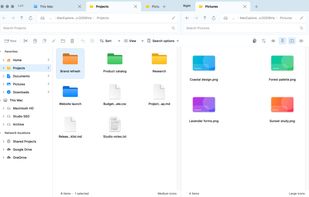
Dual-pane browsing with independent tabs, Finder color tags, and image thumbnails. Fictional sample files.

Cost / License

  • Free
  • Open Source (MIT)

Application type

Platforms

  • Mac  Requires macOS 14 or later. Universal app for Apple Silicon and Intel.
4likes
0articles
Save

Features

Features

Highlights All activities

Explorer for Mac News & Activities

Recent activities

Explorer for Mac information

AlternativeTo Category

File Management

GitHub repository

  •  1 Stars
  •  0 Forks
  •  0 Open Issues
  •   Updated  
View on GitHub
Explorer for Mac was added to AlternativeTo by Sazzad-Hossain on and this page was last updated .

No comments or reviews, maybe you want to be first?

Official Links

What is Explorer for Mac?

Explorer for Mac (MacExplorer) is a native macOS file manager developed by Binary Quest. It brings Windows Explorer-style navigation and file management to the Mac, with tabs, breadcrumbs, an expandable folder tree, pinned favorites, and dual-pane browsing.

Files can be copied, cut, pasted, moved, renamed, and sent to Trash, with conflict handling and undo. Tabs can be reordered or detached into separate windows, and files can be dragged between folders, tabs, and panes.

Filename search works within a folder or its subfolders. Results highlight matching text and show the containing folder, modification date, and size. Clicking a result's folder path opens that folder with the file selected. Details, content, and icon views support independent sorting and grouping, while native Quick Look and thumbnails provide previews.

The This Mac view shows local and external drives, storage usage, mounted network shares, and locally available cloud folders such as Google Drive. Explorer also supports Finder color tags, a configurable global shortcut, light and dark appearance, and user-selected terminal and text editor applications.

Explorer requires macOS 14 or later and supports Apple Silicon and Intel Macs. Official downloads are Developer ID signed and notarized by Apple, with signed Sparkle updates. The source code is available under the MIT license.

Explorer is a standalone file manager; macOS continues to use Finder for system integrations. Search currently matches filenames, not file contents. Cloud browsing uses providers already installed on the Mac and does not include a separate cloud sync service.