
Duplicate Photo Finder icon

Duplicate Photo Finder

Offline duplicate & similar photo finder for Windows - previews before delete, frees disk space, one-time license, nothing uploaded.
Cost / License

  • Paid
  • Proprietary

Platforms

  • Windows
0likes
0comments
0articles

Features

  1.  Duplicate File Finder

Duplicate Photo Finder News & Activities

Highlights All activities

Recent activities

Duplicate Photo Finder information

  • Developed by

    US flagSoftOrbits
  • Licensing

    Proprietary and Commercial product.
  • Alternatives

    46 alternatives listed
  • Supported Languages

    • English
Duplicate Photo Finder was added to AlternativeTo by SoftOrbits on and this page was last updated .
No comments or reviews, maybe you want to be first?

What is Duplicate Photo Finder?

Duplicate Photo Finder (SoftOrbits) is an offline Windows tool that scans your folders, drives or whole PC to find duplicate and similar photos and reclaim disk space - all locally, nothing uploaded to any cloud.

🔰 How to use

  1. Install and open the app.
  2. Drag & drop photos and folders, or run Scan Computer to check whole drives (system folders are skipped).
  3. Pick what to find (Photos, Photos + Video, All Files), set the Matching Level and press Scan.
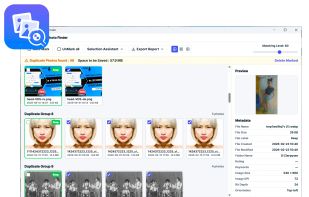
  4. Review each group - best shot kept in green - and press Delete Marked to free space.

👍 Why choose it 1?? 100% offline and private. All scanning runs on your machine - no cloud, no account. 2?? Finds look-alikes, not just exact copies: resized, re-saved in another format, edited or burst-series shots. 3?? Full preview before deleting - zoom, dimensions, size, dates and EXIF info to decide with confidence. 4?? Safe deletion. Files go to the Recycle Bin, system folders untouched, one photo per group always kept. 5?? Batch move or delete marked files in one click; Auto Mark and Selection Assistant (newest/oldest/largest/highest res). 6?? Fast on any PC - uses all CPU cores and lightweight hashing, no GPU. Live results while scanning continues. 7?? One-time license, not a subscription. Buy once, keep it for good. 8?? Works on Windows 7, 10 and 11. Supports RAW (CR2, NEF, ARW, DNG), HEIC/HEIF, videos and other files.

? Great for

  • Freeing disk space by wiping thousands of near-identical pictures.
  • Cleaning up a bloated photo archive without losing the best shot.
  • Deduplicating fresh phone or camera imports - burst and blurry shots gone in clicks.

? Is it a subscription? No - a one-time license with a free trial (daily delete limit until you buy). ? Does it upload my photos? Never - everything stays on your computer. ? Can it compare across folders and drives? Yes - global scan mode finds matches anywhere on your PC.

A private, one-time-purchase alternative to Duplicate Cleaner, VisiPics and dupeGuru.
