
Download Engine icon

Download Engine

 Like

Paste a link into Download Engine or send it from Chrome, Edge, Brave or Firefox using the companion extension. Organize downloads into queues, schedule them for later, set speed limits and resume interrupted transfers when the server supports it.
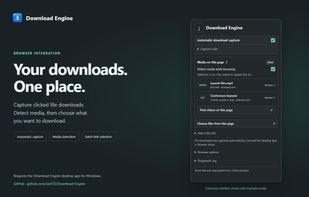
The Download Engine browser extension shows controls for automatic download capture and lets you choose which detected media to send to the desktop app.

Cost / License

  • Free
  • Open Source (MIT)

Application type

Since

  • New

GitHub

  • GitHub stars: 20

Platforms

  • Windows
  • Mac
  • Linux
0likes
0articles
Save

Features

Features

Highlights All activities

Download Engine News & Activities

Recent activities

Download Engine information

AlternativeTo Categories

File Sharing, Audio & Music

GitHub repository

  •  20 Stars
  •  3 Forks
  •  0 Open Issues
  •   Updated  
View on GitHub
Download Engine was added to AlternativeTo by Xetro on and this page was last updated .

No comments or reviews, maybe you want to be first?

What is Download Engine?

Paste a link into Download Engine or send it from Chrome, Edge, Brave or Firefox using the companion extension. Organize downloads into queues, schedule them for later, set speed limits and resume interrupted transfers when the server supports it.

Download Engine can also save videos from supported sites and lets you choose which files to download from a torrent. To check several completed downloads at once, drop the publisher’s SHA-256 checksum file onto the app and review the results. You can also verify saved torrent files offline.

Supported Languages

Keep English selected. The desktop app supports these 18 additional language choices:

Arabic, Chinese (Simplified), Chinese (Traditional), French, German, German (Switzerland), Italian, Japanese, Korean, Malay, Norwegian Bokmål, Polish, Romansh, Russian, Swedish, Thai, Ukrainian and Vietnamese.

If the form groups regional variants under a single language, select that language once.