
Dockless icon
Dockless icon

Dockless

 Like

Dockless keeps the macOS Dock hidden even when the pointer touches the edge of the screen. Use the menu bar or a global keyboard shortcut to hide or restore the Dock. You can choose a preset shortcut or record your own.
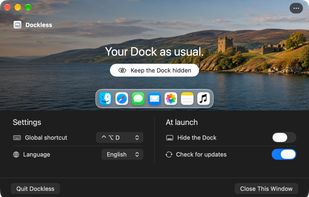
Dockless settings in English, with the global keyboard shortcut and the option to hide the Dock at launch.

Cost / License

  • Free
  • Proprietary

Since

  • New

Platforms

  • Mac  Requires macOS 13 or later. Runs on Intel and Apple silicon Macs.
0likes
0articles
Save

Features

Features

Highlights All activities

Dockless News & Activities

Recent activities

Dockless information

AlternativeTo Category

OS & Utilities
Dockless was added to AlternativeTo by TheProductivist on and this page was last updated .

No comments or reviews, maybe you want to be first?

What is Dockless?

Dockless keeps the macOS Dock hidden even when the pointer touches the edge of the screen. Use the menu bar or a global keyboard shortcut to hide or restore the Dock. You can choose a preset shortcut or record your own.

Closing the settings window leaves Dockless running. If the menu bar is out of reach, open Dockless from Spotlight to get back to its controls. You can also set Dockless to hide the Dock when it starts. Quitting the app restores your previous Dock settings.

The settings window can use a built-in landscape, a gradient, a solid color, or your own image. Dockless can check for updates at launch or on demand from the menu bar.