Dockable icon
Dockable icon

Dockable

 1 like

Dockable is a macOS-style dock for Windows 11. It shows pinned and running apps in a translucent bar at the bottom of the screen, starting from the apps already pinned to the Windows taskbar, and magnifies icons under the cursor with an adjustable size and magnification.
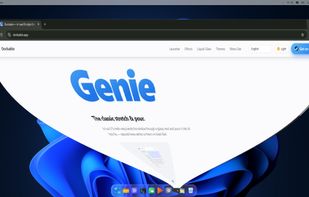
A browser window minimizing into the dock with the Genie animation.

Cost / License

  • Pay once
  • Proprietary

Since

  • New

Platforms

  • Windows
  • Steam
1like
0articles
Save

Features

Features

Highlights All activities

Dockable News & Activities

Recent activities

Dockable information

  • Developed by

    BR flagJezz Lucena
  • Licensing

    Proprietary and Commercial product.
  • Pricing

    One time purchase (perpetual license) that costs $3.
  • Alternatives

    8 alternatives listed
  • Badge

    Get an embeddable badge for Dockable
  • Supported Languages

    • English
    • Portuguese
    • Spanish
    • French
    • Italian
    • German
    • Ukrainian
    • Chinese

AlternativeTo Category

OS & Utilities
Dockable was added to AlternativeTo by Mauricio B. Holguin on and this page was last updated .

No comments or reviews, maybe you want to be first?

What is Dockable?

Dockable is a macOS-style dock for Windows 11. It shows pinned and running apps in a translucent bar at the bottom of the screen, starting from the apps already pinned to the Windows taskbar, and magnifies icons under the cursor with an adjustable size and magnification.

Apps can be reordered by dragging, files can be pinned by dropping them on the dock, and pins are removed by dragging them off. Running apps show an indicator and bounce when launched, and windows can minimize into their dock icon with Genie, Suck or Scale animations. The bar can use a translucent, acrylic or Liquid Glass style, with light, dark or automatic themes that follow Windows.

An optional macOS-style menu bar at the top of the screen shows the focused app's name and window menu, a keyboard layout switcher, shortcuts to Quick Settings and Notifications, and a clock. The Windows taskbar can be kept, auto-hidden or hidden while Dockable runs, and is restored when it closes.