


DbGate
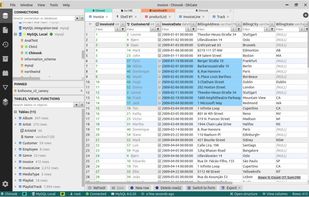
DbGate is cross-platform database manager. Simple and effective, allowing to work with many various databases simultaneously - SQL and NoSQL.

Cost / License
- Freemium (Subscription)
- Open Source (GPL-3.0)
Application type
Platforms
- Mac
- Windows
- Linux
- Online
- Flathub
- Flatpak


Features

DbGate News & Activities
Recent News
No news, maybe you know any news worth sharing?
Recent activities
- kulatynesmysl liked DbGate
I was looking for a modern, lightweight database manager to run in Docker on my cloud infrastructure (alongside PostgreSQL 16, n8n, and Next.js applications). After trying heavy alternatives like pgAdmin (which easily eats 500MB+ RAM) and outdated web clients, DbGate was a game changer.
What impressed me most:
Resource efficiency: It runs on less than 90MB of RAM without any lag. Built-in SSH Tunneling: Allowed me to securely connect to remote VPS databases without exposing port 5432 to the...
I've been running DbGate as a self-hosted Docker instance for our small engineering team for several months, mostly against MariaDB and SQL Server.
What sold me is how light it is. The container is small, it starts fast, and because it runs as a web app behind our reverse proxy, nobody needs a database client installed locally — I just hand out a URL. That alone solved a recurring support headache for us. We also run heavier tools (DBeaver and CloudBeaver) alongside it, and DbGate is...
 AbdullahKaya added DbGate as alternative to LibreDB Studio






Featured in Lists



Open-Source Slopware


DRT Stack
What is DbGate?
DbGate information
Developed by
UnknownLicensing
Open Source (GPL-3.0) and Freemium product.Pricing
Subscription ranging between $12 and $15 per month + free version with limited functionality.Written in
Rating
Average rating of 4.8Alternatives
192 alternatives listedBadge
Get an embeddable badge for DbGateSupported Languages

AlternativeTo Category
DevelopmentGitHub repository
- 7,333 Stars
- 476 Forks
- 461 Open Issues
- Updated


Comments and Reviews
I've been using this app for over 3 years, and to me this is a marvelous tool no one asked for but everyone needed.
I use it daily for my programming and database management use cases and tasks. Furthermore, I shared DbGate amongst my colleagues and apprentices so their work would be a little less tiresome and more productive, especially with different databases, for data analysis and data error discovery.
Pros:
Cons:
I was previously using pgAdmin for PostgreSQL, but over time I found it quite heavy and more complex than I needed for everyday development. Even simple tasks like finding, retrieving, or exporting the exact data I needed could sometimes take more time and effort than expected.
Then I started using DbGate, and honestly, it was a refreshing change.
What impressed me most is how lightweight and simple it feels without sacrificing the features I actually need. Working with tables, relationships, ER diagrams, queries, JOINs, and data has become much more straightforward.
One feature I particularly love is having different technologies like SQL databases, NoSQL databases, and Redis accessible from the same application. Being able to review and work with different parts of my projects in one place is incredibly convenient, especially when working on applications that use multiple data stores.
DbGate has made my database workflow faster, cleaner, and much less frustrating. After actually using it in my projects, I can confidently say it has become one of my favorite database tools.
Really great work by the DbGate team. Keep it up! 🚀
I was looking for a modern, lightweight database manager to run in Docker on my cloud infrastructure (alongside PostgreSQL 16, n8n, and Next.js applications). After trying heavy alternatives like pgAdmin (which easily eats 500MB+ RAM) and outdated web clients, DbGate was a game changer.
What impressed me most:
Resource efficiency: It runs on less than 90MB of RAM without any lag. Built-in SSH Tunneling: Allowed me to securely connect to remote VPS databases without exposing port 5432 to the public internet. UI & UX: The spreadsheet-like inline editing, tabbed navigation, and instant Excel/JSON exports make daily data exploration extremely fast. Docker deployment is effortless with environment variable configuration. DbGate has become our primary database GUI for production and development. Highly recommended for anyone running containerized stacks.
I've been running DbGate as a self-hosted Docker instance for our small engineering team for several months, mostly against MariaDB and SQL Server.
What sold me is how light it is. The container is small, it starts fast, and because it runs as a web app behind our reverse proxy, nobody needs a database client installed locally — I just hand out a URL. That alone solved a recurring support headache for us. We also run heavier tools (DBeaver and CloudBeaver) alongside it, and DbGate is consistently the one I reach for when I just need to look at data or fix a few rows quickly.
The UI deserves credit too: clean, minimal, and genuinely responsive. Inline data editing is straightforward, and tab switching stays snappy even with several connections open.
Two honest caveats. SQL autocomplete is noticeably weaker than what DBeaver offers — for anything beyond simple queries I still switch tools. And browsing very large tables gets sluggish, so it's not my first choice for heavy exploratory work on big datasets.
Neither is a dealbreaker for how we use it. For a lightweight, self-hostable, multi-database client, DbGate hits a sweet spot I haven't found elsewhere. Recommended.
DbGate has distinguished itself by offering a modern, lightweight approach compared to traditional market giants. Its key differentiator—when compared to DBeaver and Toad—is the perfect balance between simplicity and powerful performance.
While DBeaver and Toad are robust tools, they carry the baggage of older architectures: DBeaver runs on the heavy Eclipse (Java) platform, and Toad is resource-intensive (in addition to focusing almost exclusively on the Windows ecosystem). DbGate, conversely, was built using modern technologies (Svelte and Node.js), resulting in an extremely lightweight, fast client that consumes a fraction of the RAM required by its competitors.
Another crucial advantage of DbGate is its deployment flexibility. It functions both as a native desktop application (for Windows, macOS, and Linux) and as a full-featured web application that can easily run in a Docker container. This means you can access your database console directly via a browser from anywhere while maintaining the exact same user experience as the desktop version—something Toad doesn't offer, and which requires far more complex configuration in DBeaver.
Furthermore, DbGate’s native, unified support for both SQL and NoSQL databases (such as MongoDB and Redis) is completely free in the open-source version. In contrast, full NoSQL support in DBeaver is restricted to the paid (Enterprise) version, while Toad requires specific plugins or separate tools to handle multiple ecosystems. With a clean, minimalist interface free from the visual clutter of endless menus, DbGate allows you to connect and run your first query in seconds, offering smart features—such as advanced related-data navigation (master/detail views based on foreign keys)—in a much more fluid and intuitive way.
This professional database management system is highly efficient in handling large datasets. It supports multiple databases with a user-friendly interface and enterprise-level features without any complexity. The powerful database client ensures stability, speed, and efficiency across platforms, effortlessly handling large operations and balancing speed and functionality.
Fast, lightweight, truly cross-platform Professional DB management without bloat but with useful integrations Excellent performance with large datasets Multi-database support with great UX Fast and reliable across all platforms Enterprise-level features without complexity Powerful database client for real work Stable, fast, and efficient everywhere Handles large database operations easily Best balance of speed and functionality..
As an IT security expert and certified IT appraiser, I work across Windows, Linux, and macOS environments and regularly interact with different database systems in customer infrastructures. DbGate gives me a consistent and fast interface everywhere, which significantly improves efficiency and reduces complexity in daily operations. Another major benefit is performance. Many database tools become slow or overloaded when working with large datasets or remote connections over VPN/internet environments. DbGate remains responsive even during larger operations. In one environment, processing around 12,000 updates within a database completed within seconds, which noticeably improved workflow speed during analysis and maintenance tasks. DbGate also helps simplify professional investigations, troubleshooting, and data analysis because it combines multi-database support with a clean and lightweight interface. Instead of maintaining several heavy enterprise tools, I can centralize much of the work in a single solution. For me, the biggest benefit is reliability and efficiency in real-world professional use cases without unnecessary complexity.