CustomShortcuts icon

CustomShortcuts

Keyboard shortcuts help you work efficiently. Add keyboard shortcuts to common tasks. Use shortcuts that are easy to reach and easy to remember. Get your work done faster.
CustomShortcuts screenshot 1

Cost / License

  • Free
  • Proprietary

Platforms

  • Mac
2likes
0articles
Save

Features

Features

Highlights All activities

CustomShortcuts News & Activities

Recent activities

No activities found.

CustomShortcuts information

CustomShortcuts was added to AlternativeTo by Paul on and this page was last updated .

No comments or reviews, maybe you want to be first?

Official Links

Install from the command line

  • brew install --cask customshortcuts

Be careful what you paste into a terminal. Check what a command installs before running it.

What is CustomShortcuts?

Keyboard shortcuts help you work efficiently. Add keyboard shortcuts to common tasks. Use shortcuts that are easy to reach and easy to remember. Get your work done faster.

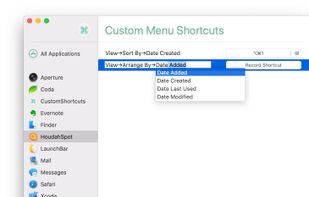
Use CustomShortcuts to add keyboard shortcuts to menu items in most Mac applications.

  • Assign custom keyboard shortcuts to Mac menu items
  • Auto-completion helps you navigate menu hierarchies
  • It makes sure you get menu titles exactly right
  • CustomShortcuts checks for ambiguous menu items
  • Copy & paste shortcuts between applications

Most Mac applications support user-defined keyboard shortcuts. CustomShortcuts makes it easy to add your own shortcuts.